 Firefox
 1 / 8
1 / 8About Minimalist Flower Font
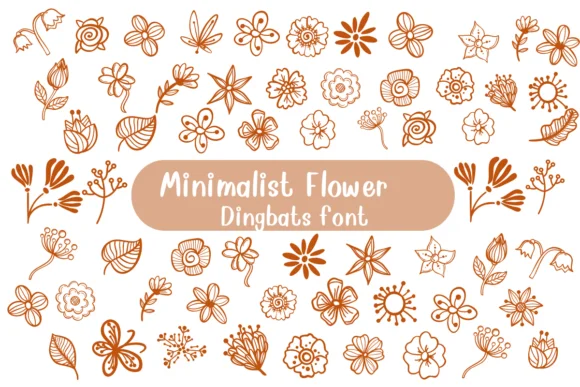
Minimalist Flower by Nongyao is a dingbat collection of refined botanical illustrations that strips florals down to their most essential forms. The font delivers individual flower and leaf elements with clean lines and intelligent negative space, perfectly suited for building custom monogram designs, creating luxury beauty packaging, assembling wedding invitation suites, and developing tattoo reference collections. Each character feels hand-drawn in its construction yet precise in its rendering, letting you combine multiple blooms freely without sacrificing visual clarity or design unity.
You get both OTF and TTF formats loaded with outline and coloring variants that work across Adobe Creative Suite, Affinity Designer, and Procreate. These aren't locked into a single narrow style, so they function as modular botanical building blocks that scale confidently across applications from large poster compositions down to small product labels. Rather than hunting through image libraries or hand-sketching botanical elements custom for every project, you can rely on a single coherent source that maintains visual consistency. Keep these blooms on hand whenever you're designing stationery suites, packaging systems, branding collateral, or illustration projects that need organic detail woven throughout. You'll find Minimalist Flower ready on Creative Fabrica whenever you need flexible botanical character elements for your next work.
Style & Use Cases
- Overall Style
- Iconographic, Fonts
- Use Case
- Icons, Accents
- Ideal For
- ornaments, bullets, and decorative flourishes
- Pairs With
- any text font
How to Install Minimalist Flower Font
Step-by-step instructions for every platform
- 1Download the Minimalist Flower font file (.ttf or .otf).
- 2Locate the downloaded file in your Downloads folder.
- 3Right-click the font file.
- 4Select "Install" to install for the current user, or "Install for all users" to make it available system-wide.
- 5Minimalist Flower is now available in Word, Photoshop, Illustrator, and all other apps.




Browse fonts by theme
Curated collections →Saw a font in a picture? Identify any font from an image with our free Font Finder.
More Dingbats Fonts
Browse all →







What pairs well with Minimalist Flower Font?
Minimalist Flower Font is a versatile dingbats font that works for both headings and body text. Pair it with a contrasting sans-serif or serif font to add visual interest and a clear distinction between titles and body copy.




Minimalist Flower Font
by Nongyao
Reviewed by the FontBoxDL team · Updated July 2026