 Firefox
 1 / 7
1 / 7About Mini Landscape Font
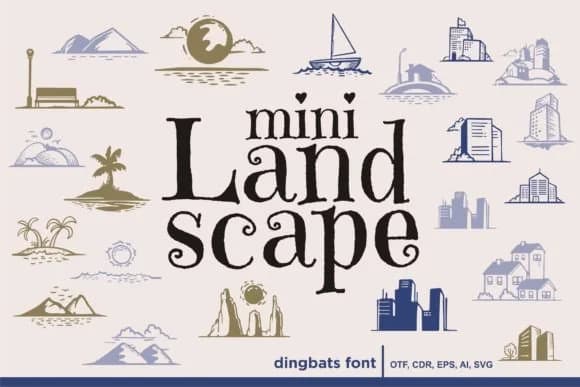
Mini Landscape, designed by onoborgol, is a collection of handdrawn landscape elements rendered as a dingbat font. The letterforms carry an organic, sketchy quality that feels intentional rather than rough, making these small-scale symbols approachable and genuinely useful. Each glyph captures natural details: trees, shrubs, terrain features, and botanical touches that function as standalone decorative marks or coordinated sets within larger compositions.
The vector-based construction means these elements scale cleanly across applications, from fine detail work to larger format uses without loss of character. You'll find this font particularly valuable for scrapbooking layouts where you need scattered nature accents, wedding invitation suites that call for hand-lettered charm, greeting card designs with a craft aesthetic, and DIY planner pages where small botanical flourishes tie compositions together. The handdrawn quality keeps designs from reading as overly polished, which works across both casual and semi-formal contexts.
This font appeals directly to makers, card designers, and anyone building stationery or paper projects with a personal, human-made aesthetic. Layering these landscape elements into illustration work, using them as punctuation marks in type-forward layouts, or embedding them throughout packaging design all highlight that sketched quality suggesting care and craft. Find it on Creative Fabrica to add these handdrawn landscapes to your resource collection.
Style & Use Cases
- Overall Style
- Iconographic, Handdrawn
- Use Case
- Icons, Accents
- Ideal For
- ornaments, bullets, and decorative flourishes
- Pairs With
- any text font
How to Install Mini Landscape Font
Step-by-step instructions for every platform
- 1Download the Mini Landscape font file (.ttf or .otf).
- 2Locate the downloaded file in your Downloads folder.
- 3Right-click the font file.
- 4Select "Install" to install for the current user, or "Install for all users" to make it available system-wide.
- 5Mini Landscape is now available in Word, Photoshop, Illustrator, and all other apps.
More by onoborgol
View all →
Browse fonts by theme
Curated collections →Saw a font in a picture? Identify any font from an image with our free Font Finder.
More Dingbats Fonts
Browse all →







What pairs well with Mini Landscape Font?
Mini Landscape Font is a versatile dingbats font that works for both headings and body text. Pair it with a contrasting sans-serif or serif font to add visual interest and a clear distinction between titles and body copy.



Mini Landscape Font
by onoborgol
Reviewed by the FontBoxDL team · Updated July 2026