 Firefox
 1 / 2
1 / 2About Mini Book and Paper Font
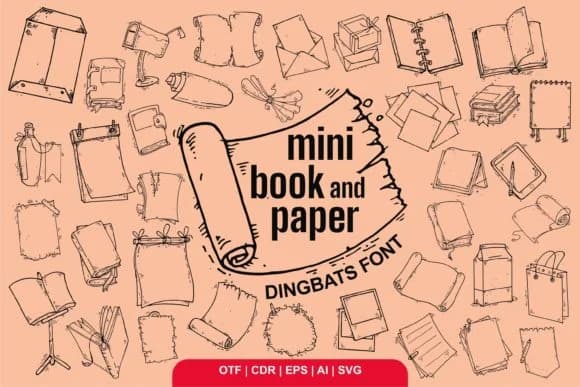
Mini Book and Paper by Onoborgol is a playful dingbat typeface with a comic-inspired personality. The quirky glyph set brings genuine character to any project where playfulness strengthens the message. You'll find yourself reaching for it when designing scrapbooking embellishments, comic strip layouts, homemade zine designs, and children's activity worksheets. Each individual symbol maintains that hand-drawn feel while staying crisp and legible, making the font surprisingly flexible across both print and digital applications.
Where this font truly shines is in its adaptability. Pair it alongside body copy in greeting cards to inject visual interest without drowning out the message, or use it as the visual foundation for custom sticker packs and digital icons. Presentation decks benefit enormously when these playful marks interrupt dense slides and add breathing room. Crafters and DIY enthusiasts appreciate how the casual aesthetic works across everything from merchandise labels to handmade planner spreads and scrapbook page layouts. The lighthearted character makes this particularly valuable whenever you're designing for younger audiences or any scenario calling for an approachable, friendly tone rather than something corporate or formal.
Grab Mini Book and Paper from Creative Fabrica to add genuine comic-book charm to your greeting card designs, digital presentations, DIY craft projects, or anything that needs a playful personality and visual warmth.
Style & Use Cases
- Overall Style
- Iconographic, Comic
- Use Case
- Icons, Accents
- Ideal For
- ornaments, bullets, and decorative flourishes
- Pairs With
- any text font
How to Install Mini Book and Paper Font
Step-by-step instructions for every platform
- 1Download the Mini Book and Paper font file (.ttf or .otf).
- 2Locate the downloaded file in your Downloads folder.
- 3Right-click the font file.
- 4Select "Install" to install for the current user, or "Install for all users" to make it available system-wide.
- 5Mini Book and Paper is now available in Word, Photoshop, Illustrator, and all other apps.
More by Onoborgol
View all →

Browse fonts by theme
Curated collections →Saw a font in a picture? Identify any font from an image with our free Font Finder.
More Dingbats Fonts
Browse all →







What pairs well with Mini Book and Paper Font?
Mini Book and Paper Font is a versatile dingbats font that works for both headings and body text. Pair it with a contrasting sans-serif or serif font to add visual interest and a clear distinction between titles and body copy.



Mini Book and Paper Font
by Onoborgol
Reviewed by the FontBoxDL team · Updated July 2026