 Firefox
 1 / 5
1 / 5About MILLINERY JNL Font
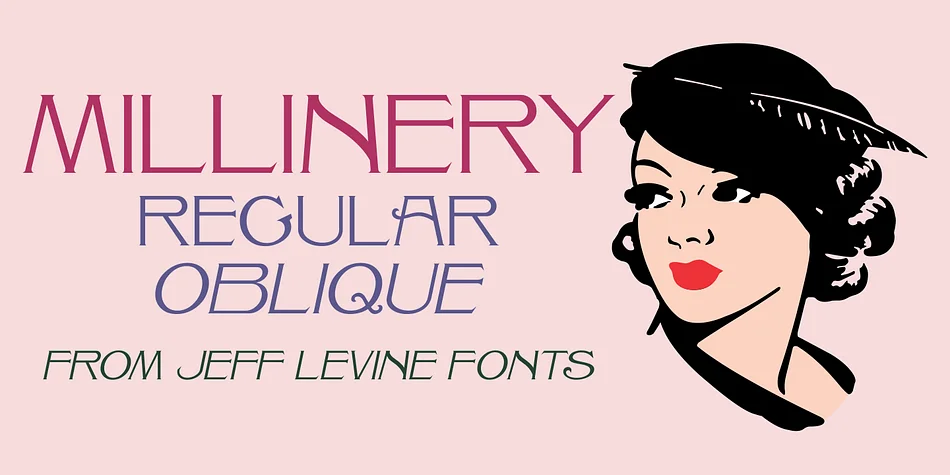
The spurred serifs and flowing letterforms of this Art Nouveau typeface carry the refined elegance characteristic of early 20th-century design. Created by Jeff Levine Fonts, Millinery JNL is rooted in a 1907 Barnhart Brothers & Spindler specimen book entry originally called "Sterling," bringing authentic typographic heritage into contemporary work.
Art Nouveau faces like this one address a specific set of design needs where classical sophistication genuinely matters. Wedding invitation suites benefit from its period-correct personality, as do handcrafted apothecary labels, luxury cosmetics packaging, botanical stationery, and nostalgic storefront signage for antique shops, tea rooms, and rare bookshops. The font comes in both regular and oblique versions, giving you flexibility in composition. You might set body copy upright and tilt the oblique for visual rhythm and secondary emphasis, or use the slanted version as your primary display weight.
Designers who want to signal heritage and refined taste without veering into pastiche will find this font particularly useful. The letterforms balance decorative personality with functional readability, making them suitable for everything from standalone display work to integration within larger design systems. If this aesthetic aligns with your projects, you can find Millinery JNL on Creative Fabrica.
Style & Use Cases
- Overall Style
- Bold, Distinctive
- Use Case
- Headlines, Posters
- Ideal For
- logos, packaging, and standout titles
- Pairs With
- a neutral sans-serif
How to Install MILLINERY JNL Font
Step-by-step instructions for every platform
- 1Download the MILLINERY JNL font file (.ttf or .otf).
- 2Locate the downloaded file in your Downloads folder.
- 3Right-click the font file.
- 4Select "Install" to install for the current user, or "Install for all users" to make it available system-wide.
- 5MILLINERY JNL is now available in Word, Photoshop, Illustrator, and all other apps.
More by Jeff Levine Fonts
View all →



Browse fonts by theme
Curated collections →Saw a font in a picture? Identify any font from an image with our free Font Finder.
More Decorative Fonts
Browse all →







What pairs well with MILLINERY JNL Font?
MILLINERY JNL Font is a decorative font that shines as a display or heading face. Pair it with a clean sans-serif or serif font for body text — the contrast creates a clear hierarchy while the two styles stay balanced and easy to read.




MILLINERY JNL Font
Reviewed by the FontBoxDL team · Updated June 2026