 Firefox
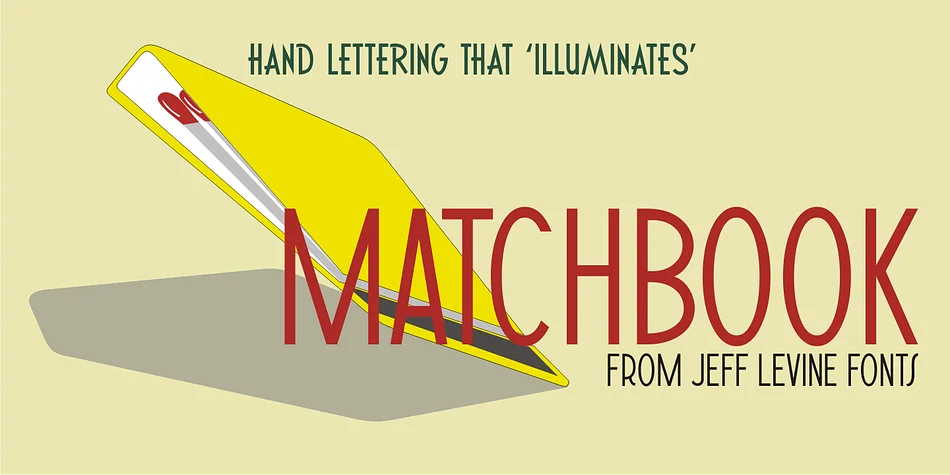
About MATCHBOOK JNL Font
MATCHBOOK JNL by Jeff Levine Fonts is a decorative typeface rooted in vintage hand lettering from a classic matchbook at Miami Beach's Carrousel Restaurant. This captures the spirit of mid-century design with genuine character that feels historically grounded rather than forced or kitschy. Playful energy comes through without sacrificing authenticity.
Graphic designers reach for this font when working on retro diner menus, vintage speakeasy branding, or nostalgic event invitations where that warm, hand-crafted quality is essential. Antique shop signage and retro cocktail bar packaging are equally strong applications. Its letterforms have the right period accuracy without feeling stiff or like a museum piece. Because the typeface derives from actual signage rather than modern reinterpretation, there's genuine integrity in the design that resonates with contemporary audiences. Designers often turn to it when they want authentic midcentury credibility without spending hours hunting down original reference materials or hand-lettering everything from scratch.
The hand-drawn quality remains consistent throughout all applications, even simple type work, giving genuine character and authenticity to straightforward projects. This font carries the weight for heritage brand redesigns or any project where serious vintage bones matter. Grab it on Creative Fabrica to bring that real midcentury energy to your next project.
Style & Use Cases
- Overall Style
- Bold, Distinctive
- Use Case
- Headlines, Posters
- Ideal For
- logos, packaging, and standout titles
- Pairs With
- a neutral sans-serif
How to Install MATCHBOOK JNL Font
Step-by-step instructions for every platform
- 1Download the MATCHBOOK JNL font file (.ttf or .otf).
- 2Locate the downloaded file in your Downloads folder.
- 3Right-click the font file.
- 4Select "Install" to install for the current user, or "Install for all users" to make it available system-wide.
- 5MATCHBOOK JNL is now available in Word, Photoshop, Illustrator, and all other apps.
More by Jeff Levine Fonts
View all →



Browse fonts by theme
Curated collections →Saw a font in a picture? Identify any font from an image with our free Font Finder.
More Decorative Fonts
Browse all →







What pairs well with MATCHBOOK JNL Font?
MATCHBOOK JNL Font is a decorative font that shines as a display or heading face. Pair it with a clean sans-serif or serif font for body text — the contrast creates a clear hierarchy while the two styles stay balanced and easy to read.




MATCHBOOK JNL Font
Reviewed by the FontBoxDL team · Updated June 2026