
 1 / 9
1 / 9About Manhattan Font
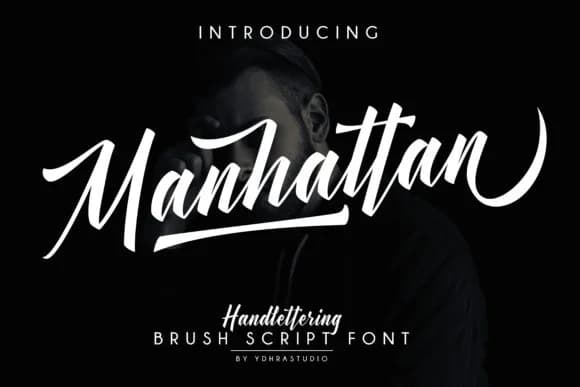
You're working on a wedding invitation suite and need something that feels personal without looking DIY or unprofessional. Manhattan Font by YdhraStudio delivers exactly that: a light handwritten script with genuine warmth. The brushy letterforms carry authentic character while remaining structured enough for printed work, giving you a font that bridges the gap between handwritten and polished.
In practice, this script excels across multiple real-world projects. Wedding invitation suites benefit from the personal touch, especially when you add matching envelope addresses. Custom greeting cards look like they were actually written by hand. Boutique skincare packaging labels gain that artisanal quality consumers respond to. DIY craft signs and small business branding work here without feeling overly decorative. The swash style stays readable and grounded. When you need emphasis, stylistic alternates let you add flourish to specific letters, creating visual interest without cluttering the design.
Practically speaking, Manhattan performs well across different scales. At large sizes for headers and signage, the letterforms breathe and showcase the brushwork. At smaller sizes in body text or label copy, it maintains legibility without becoming cramped. It's a font that actually works where you use it, not one that looks good only at a single size. Find Manhattan on Creative Fabrica and bring that handwritten character to your next project.
Style & Use Cases
- Overall Style
- Elegant, Flowing, Manhattan Brush
- Use Case
- Invitations, Branding
- Ideal For
- wedding stationery, greeting cards, and signatures
- Pairs With
- a simple uppercase sans
How to Install Manhattan Font Font
Step-by-step instructions for every platform
- 1Download the Manhattan Font font file (.ttf or .otf).
- 2Locate the downloaded file in your Downloads folder.
- 3Right-click the font file.
- 4Select "Install" to install for the current user, or "Install for all users" to make it available system-wide.
- 5Manhattan Font is now available in Word, Photoshop, Illustrator, and all other apps.
More by YdhraStudio
View all →
More Script Handwritten Fonts
Browse all →







What pairs well with Manhattan Font?
Manhattan Font is a script font that shines as a display or heading face. Pair it with a clean sans-serif or serif font for body text — the contrast creates a clear hierarchy while the two styles stay balanced and easy to read.



Manhattan Font
by YdhraStudio
Reviewed by the FontBoxDL team · Updated June 2026