 Firefox
 1 / 8
1 / 8About Magnolia Bloom Font
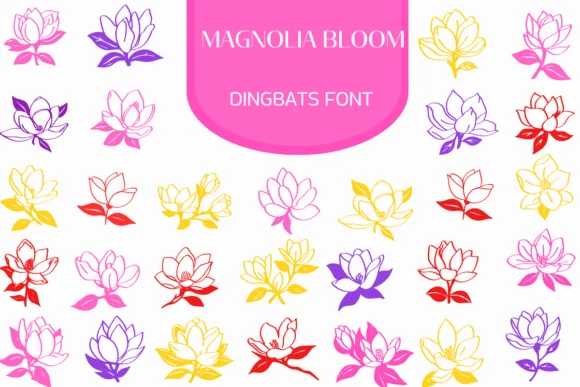
Magnolia Bloom by Heartcraft Atelier is a hand-sketched floral dingbat font that gives you a complete library of botanical line art. The glyphs feature pencil-drawn flowers, buds, and foliage ready to layer into compositions as decorative details or focal points. Available in both OTF and TTF with outlined versions for hand-coloring, it pairs naturally with lettering work and custom typography.
Wedding invitation suites gain an immediate organic feel when paired with these flowering glyphs. Botanical journal spreads benefit from sprinkling these elements throughout margins and headers, adding visual texture without overwhelming the page. Spring bridal shower invitations work beautifully with the hand-drawn aesthetic, especially when combined with script fonts. Product designers working on boutique botanical brands, skincare packaging, and artisan food labels find the illustrated linework hits that sweet spot between polished and handmade.
Procreate users can trace these outlines for custom digital painting, while Affinity Designer and Affinity Photo folks layer them as textures or use them as starting points for new graphics. Craft enthusiasts appreciate the style for DIY sign-making and handmade greeting cards. Social media creators building seasonal content around gardening, wellness, or lifestyle brands can use these dingbats consistently across posts. Scrapbookers and visual journal keepers find the elements add authentic character without requiring advanced design skills.
Grab Magnolia Bloom from Creative Fabrica and let these botanical details transform your next project.
Style & Use Cases
- Overall Style
- Iconographic, Fonts
- Use Case
- Icons, Accents
- Ideal For
- ornaments, bullets, and decorative flourishes
- Pairs With
- any text font
How to Install Magnolia Bloom Font
Step-by-step instructions for every platform
- 1Download the Magnolia Bloom font file (.ttf or .otf).
- 2Locate the downloaded file in your Downloads folder.
- 3Right-click the font file.
- 4Select "Install" to install for the current user, or "Install for all users" to make it available system-wide.
- 5Magnolia Bloom is now available in Word, Photoshop, Illustrator, and all other apps.
More by Heartcraft Atelier
View all →



Browse fonts by theme
Curated collections →Saw a font in a picture? Identify any font from an image with our free Font Finder.
More Dingbats Fonts
Browse all →







What pairs well with Magnolia Bloom Font?
Magnolia Bloom Font is a versatile dingbats font that works for both headings and body text. Pair it with a contrasting sans-serif or serif font to add visual interest and a clear distinction between titles and body copy.




Magnolia Bloom Font
Reviewed by the FontBoxDL team · Updated June 2026