 Firefox
 1 / 5
1 / 5About LOCAL JEWELER JNL Font
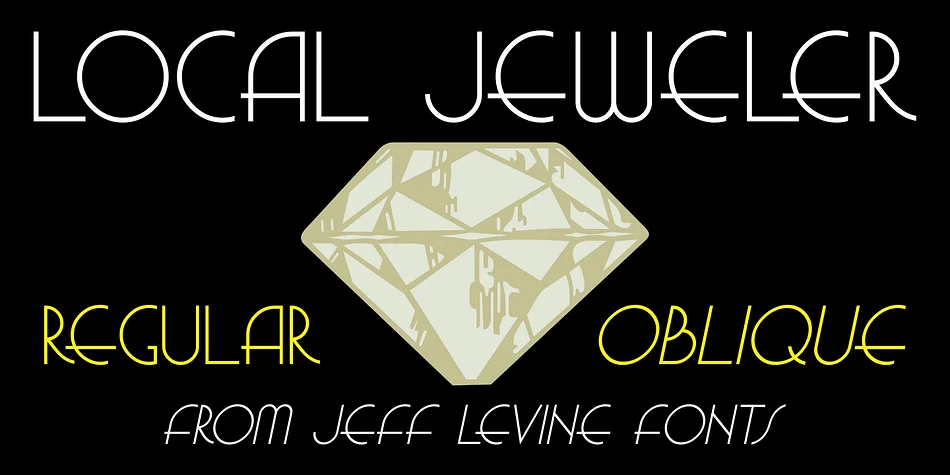
Local Jeweler JNL by Jeff Levine Fonts is a thin Art Deco sans serif drawn from 1940s commercial signage. The typeface captures that distinctive era through clean, geometric letterforms and restrained sophistication, performing equally well at display sizes and smaller scales. You get both regular and oblique versions, which gives you the flexibility to add directional emphasis and variation without switching typeface families entirely.
This font finds its home in vintage jewelry box labels, art deco wedding invitations, retro-inspired beauty product packaging, and antique shop window signage where understated geometry outshines unnecessary flourish. Boutique restaurant menus and craft beverage labels seeking that particular mid-century commercial sensibility benefit equally well. The thin weight never feels cold or distant, even when channeling design language from decades past, reading as both authentically vintage and deliberately contemporary. That duality makes it equally valuable for heritage brands authenticating their vintage roots and modern projects that borrow nostalgia with purpose and intention.
If you find yourself building layouts around that sweet intersection of 1940s charm and clean geometric form, this typeface does the heavy work for you. Pick up Local Jeweler JNL on Creative Fabrica when you're ready to bring that authentic vintage precision to your next project.
Style & Use Cases
- Overall Style
- Bold, Distinctive
- Use Case
- Headlines, Posters
- Ideal For
- logos, packaging, and standout titles
- Pairs With
- a neutral sans-serif
How to Install LOCAL JEWELER JNL Font
Step-by-step instructions for every platform
- 1Download the LOCAL JEWELER JNL font file (.ttf or .otf).
- 2Locate the downloaded file in your Downloads folder.
- 3Right-click the font file.
- 4Select "Install" to install for the current user, or "Install for all users" to make it available system-wide.
- 5LOCAL JEWELER JNL is now available in Word, Photoshop, Illustrator, and all other apps.
More by Jeff Levine Fonts
View all →



Browse fonts by theme
Curated collections →Saw a font in a picture? Identify any font from an image with our free Font Finder.
More Decorative Fonts
Browse all →







What pairs well with LOCAL JEWELER JNL Font?
LOCAL JEWELER JNL Font is a decorative font that shines as a display or heading face. Pair it with a clean sans-serif or serif font for body text — the contrast creates a clear hierarchy while the two styles stay balanced and easy to read.




LOCAL JEWELER JNL Font
Reviewed by the FontBoxDL team · Updated June 2026