 Firefox
 1 / 8
1 / 8About Light and Dark Font
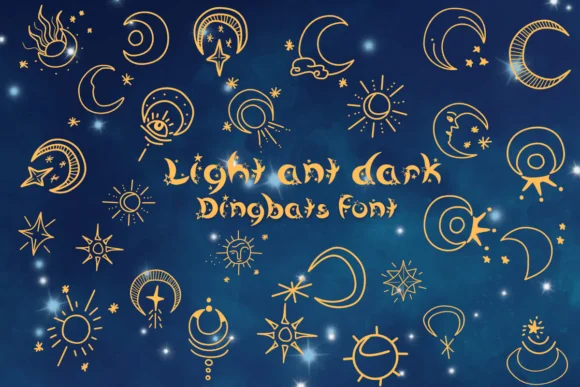
Light and Dark by Nongyao is a dingbat collection built around sun and moon characters that work for layering celestial imagery into your designs. Every character is a distinct illustration rather than a typical letter, so you can mix and match individual symbols to build custom compositions that feel deliberately chosen. The set includes enough variation in weight and style to keep pieces looking fresh and hand-drawn, from simple single-element use to complex multi-layered artwork across an entire page. No two suns look identical, and the moons come in different phases, giving you multiple options for visual rhythm and composition balance.
This collection shines for celestial-themed wedding invitations, illustrated children's books, astrology-focused social media graphics, and hand-lettered craft labels where you need quick visual storytelling without heavy illustration work. Each element is completely standalone, so you can scale, rotate, and arrange them freely without worrying about letter spacing or kerning interfering. The flexibility means you're never locked into a single layout direction or size. Pair these with serif fonts or organic scripts for typographic grounding, or use them solo as striking layered design elements across a page.
Grab Light and Dark on Creative Fabrica to start building your own sun and moon compositions.
Style & Use Cases
- Overall Style
- Iconographic, Decorations
- Use Case
- Icons, Accents
- Ideal For
- ornaments, bullets, and decorative flourishes
- Pairs With
- any text font
How to Install Light and Dark Font
Step-by-step instructions for every platform
- 1Download the Light and Dark font file (.ttf or .otf).
- 2Locate the downloaded file in your Downloads folder.
- 3Right-click the font file.
- 4Select "Install" to install for the current user, or "Install for all users" to make it available system-wide.
- 5Light and Dark is now available in Word, Photoshop, Illustrator, and all other apps.




Browse fonts by theme
Curated collections →Saw a font in a picture? Identify any font from an image with our free Font Finder.
More Dingbats Fonts
Browse all →







What pairs well with Light and Dark Font?
Light and Dark Font is a versatile dingbats font that works for both headings and body text. Pair it with a contrasting sans-serif or serif font to add visual interest and a clear distinction between titles and body copy.




Light and Dark Font
by Nongyao
Reviewed by the FontBoxDL team · Updated July 2026