 Firefox
 1 / 4
1 / 4About Leavy Leaf Font
Picture yourself designing botanical wedding stationery, layering delicate leaf ornaments across invitation corners and around thank-you card borders. Leavy Leaf, by DesignFour, is a dingbats collection packed with organic branch illustrations and foliage elements that work beautifully as decorative accents. The font shines when building pressed flower scrapbooking layouts, where its leaf motifs frame photos and handwritten journaling. Eco-friendly product packaging benefits from these natural illustrations too, especially for herbal tea labels, artisan honey packaging, or skincare lines that emphasize botanical ingredients. Designers also use it for hand-drawn aesthetic branding on small batch goods and craft packaging that needs a personal touch.
What makes this collection genuinely useful is its range of leaf variations and branch shapes. You can combine different glyphs to build ornamental borders, frame text blocks, or create organic dividers without hunting for a companion font. The glyph set includes multiple leaf styles and branch configurations, letting you customize the visual mood of your designs. The illustrations read clearly at both large and small scales, making them work equally well for garden club newsletter headers and intimate thank-you card designs. You get enough variety to build layered compositions if you're working on something more complex.
Grab Leavy Leaf on Creative Fabrica and start using these botanical elements in your next project.
Style & Use Cases
- Overall Style
- Iconographic, Leavy Font
- Use Case
- Icons, Accents
- Ideal For
- ornaments, bullets, and decorative flourishes
- Pairs With
- any text font
How to Install Leavy Leaf Font
Step-by-step instructions for every platform
- 1Download the Leavy Leaf font file (.ttf or .otf).
- 2Locate the downloaded file in your Downloads folder.
- 3Right-click the font file.
- 4Select "Install" to install for the current user, or "Install for all users" to make it available system-wide.
- 5Leavy Leaf is now available in Word, Photoshop, Illustrator, and all other apps.
More by DesignFour
View all →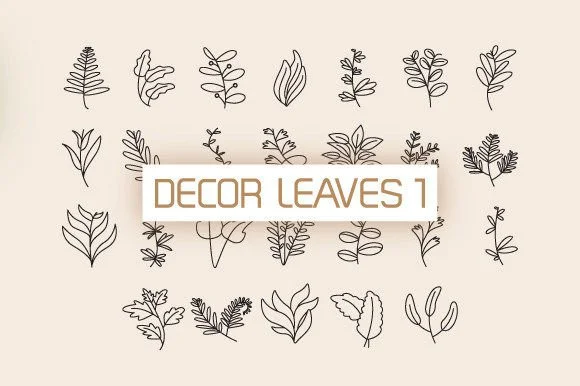
Browse fonts by theme
Curated collections →Saw a font in a picture? Identify any font from an image with our free Font Finder.
More Dingbats Fonts
Browse all →







What pairs well with Leavy Leaf Font?
Leavy Leaf Font is a versatile dingbats font that works for both headings and body text. Pair it with a contrasting sans-serif or serif font to add visual interest and a clear distinction between titles and body copy.




Leavy Leaf Font
by DesignFour
Reviewed by the FontBoxDL team · Updated August 2026