 Firefox
 1 / 3
1 / 3About Decor Leaves Font
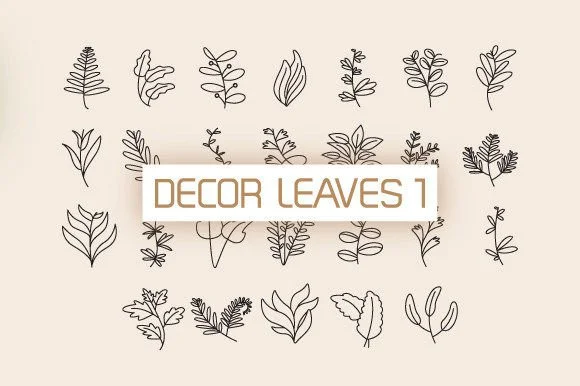
This dingbats collection gives you a set of carefully drawn leaves and branches that function as complete design elements in their own right. Rather than simple line work, each piece carries genuine botanical detail meant to ground a design in something natural and considered. Decor Leaves, created by DesignFour, serves designers who need actual flora elements rather than generic decorative shapes.
Where does this font earn its place in your toolkit? Consider wedding invitation suites that need hand-drawn botanical borders and layered leaf elements. Think of packaging for artisanal tea, herbal skincare products, or eco-conscious product lines where the visual needs to feel organic and intentional. Hand-lettered branding for naturalist or sustainable fashion lines works well with these glyphs scattered throughout compositions, and nature-themed greeting cards and stationery benefit from having real leaf and branch forms instead of abstract shapes. Since these are dingbats, you can rotate, scale, and layer them freely without the constraints that come with traditional letterform-based fonts.
This font suits anyone building designs centered on botanical authenticity. The collection offers enough variety to create layered, cohesive visual compositions without repetition becoming obvious. Find Decor Leaves on Creative Fabrica when you're ready to add genuine floral elements to your work.
Style & Use Cases
- Overall Style
- Iconographic, Flower
- Use Case
- Icons, Accents
- Ideal For
- ornaments, bullets, and decorative flourishes
- Pairs With
- any text font
How to Install Decor Leaves Font
Step-by-step instructions for every platform
- 1Download the Decor Leaves font file (.ttf or .otf).
- 2Locate the downloaded file in your Downloads folder.
- 3Right-click the font file.
- 4Select "Install" to install for the current user, or "Install for all users" to make it available system-wide.
- 5Decor Leaves is now available in Word, Photoshop, Illustrator, and all other apps.
More by DesignFour
View all →
Browse fonts by theme
Curated collections →Saw a font in a picture? Identify any font from an image with our free Font Finder.
More Dingbats Fonts
Browse all →







What pairs well with Decor Leaves Font?
Decor Leaves Font is a versatile dingbats font that works for both headings and body text. Pair it with a contrasting sans-serif or serif font to add visual interest and a clear distinction between titles and body copy.




Decor Leaves Font
by DesignFour
Reviewed by the FontBoxDL team · Updated August 2026