 Firefox
 1 / 8
1 / 8About Leaf Font
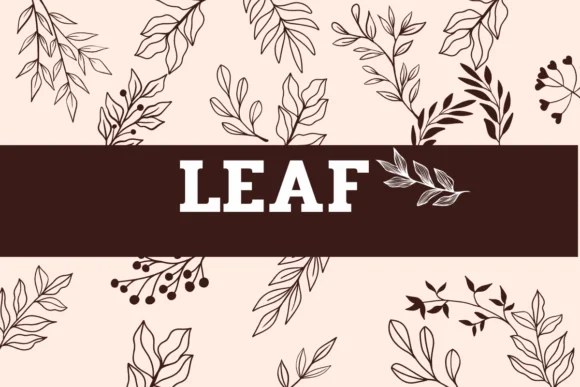
Sirinart's Leaf is a hand-drawn dingbats collection offering a series of botanical marks and nature-inspired symbols instead of traditional letters. Each character carries a sketchy, pencil-drawn quality that feels personal and organic, as though pulled straight from a designer's mood board or sketchbook. The loose, imperfect linework gives every element its own distinct personality.
The symbol set works beautifully for adding naturalistic accents to wedding invitation suites, where leaf motifs and botanical borders can frame text and add organic elegance. Etsy sellers use these marks effectively on product labels and seasonal packaging, especially for herbal tea brands, botanical skincare lines, or fall-themed product collections. DIY decorators and craft enthusiasts find these marks essential for custom stickers, scrapbook embellishments, handmade greeting cards, and layered gift tags. These marks work especially well for seasonal decorations, from autumn displays and spring floral arrangements to summer event graphics and holiday embellishments. The doodle-heavy aesthetic also suits branding work for florists, wellness companies, and sustainable lifestyle brands seeking authentic organic visual language.
This collection belongs in the toolkit of designers creating nature-forward projects, especially those building boutique, handmade aesthetics for customers who value slow design and craft tradition. Access Leaf on Creative Fabrica as part of your subscription.
Style & Use Cases
- Overall Style
- Iconographic, Dingbats Fonts
- Use Case
- Icons, Accents
- Ideal For
- ornaments, bullets, and decorative flourishes
- Pairs With
- any text font
How to Install Leaf Font
Step-by-step instructions for every platform
- 1Download the Leaf font file (.ttf or .otf).
- 2Locate the downloaded file in your Downloads folder.
- 3Right-click the font file.
- 4Select "Install" to install for the current user, or "Install for all users" to make it available system-wide.
- 5Leaf is now available in Word, Photoshop, Illustrator, and all other apps.
More by Sirinart
View all →

Browse fonts by theme
Curated collections →Saw a font in a picture? Identify any font from an image with our free Font Finder.
More Dingbats Fonts
Browse all →







What pairs well with Leaf Font?
Leaf Font is a versatile dingbats font that works for both headings and body text. Pair it with a contrasting sans-serif or serif font to add visual interest and a clear distinction between titles and body copy.




Leaf Font
by Sirinart
Reviewed by the FontBoxDL team · Updated July 2026