 Firefox
 1 / 8
1 / 8Loading font…
About Lasercut Font
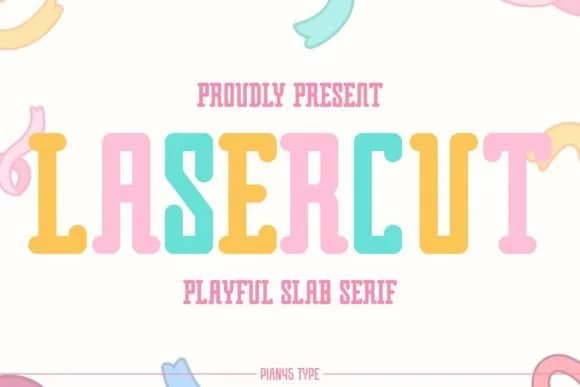
This font strikes a balance between retro print aesthetics and contemporary craft energy, bringing together geometric form with just enough personality to feel genuinely lively. Lasercut is a condensed slab serif designed by Pian45, and it combines the solidity of geometric letterforms with subtle playfulness that makes it especially effective on designs where character and presence matter more than strict formality.
The font shines when applied to indie product packaging and label designs, hand-lettered comic book covers, vinyl sticker collections, and limited-edition music poster artwork. Its condensed structure means it packs visual impact into tight spaces without sacrificing legibility, which matters significantly when working within real-world constraints. Because the typeface offers multiple weights, designers can layer different sizes and weights to build hierarchy and visual depth without needing to switch typefaces. The condensed width also gives you room to experiment with larger sizes even in compact layouts.
Pair Lasercut with a clean, minimal sans-serif for body copy to let the slab serif's distinctive character do the heavy lifting in headlines and display callouts. The contrast between the two creates visual breathing room while keeping the overall design cohesive and intentional. Grab it on Creative Fabrica and start putting these blocky, expressive letterforms into your next project.
Style & Use Cases
- Overall Style
- Sturdy, Confident, Vintage Font
- Use Case
- Headlines, Merch
- Ideal For
- vintage posters, logos, and product packaging
- Pairs With
- a light sans-serif
How to Install Lasercut Font
Step-by-step instructions for every platform
- 1Download the Lasercut font file (.ttf or .otf).
- 2Locate the downloaded file in your Downloads folder.
- 3Right-click the font file.
- 4Select "Install" to install for the current user, or "Install for all users" to make it available system-wide.
- 5Lasercut is now available in Word, Photoshop, Illustrator, and all other apps.
Browse fonts by theme
Curated collections →Saw a font in a picture? Identify any font from an image with our free Font Finder.
More Slab Serif Fonts
Browse all →







What pairs well with Lasercut Font?
Lasercut Font is a slab serif font that shines as a display or heading face. Pair it with a clean sans-serif or serif font for body text — the contrast creates a clear hierarchy while the two styles stay balanced and easy to read.



Lasercut Font
by Pian45
Reviewed by the FontBoxDL team · Updated October 2026