 Firefox
 1 / 8
1 / 8Loading font…
About Laser Cut Heart Font
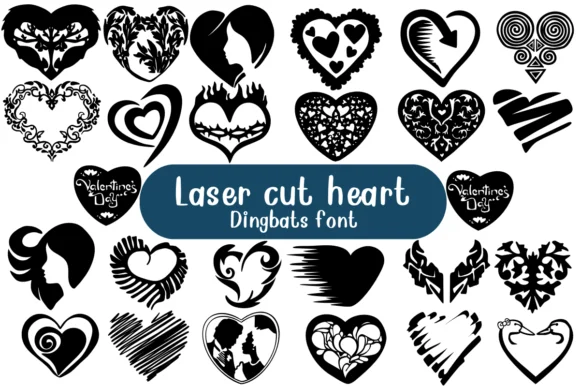
Laser Cut Heart by Nongyao is a decorative dingbat font where every character is a distinct heart shape, layered with ornamental linework and filigree details. Instead of a single repeated glyph, you get dozens of variations: interlocking patterns, fancy frames, outlined florals, and delicate flourishes that work beautifully at multiple scales and layered together.
The real usefulness emerges in application. These shapes work wonderfully for Valentine's Day card suites, scrapbooking accent pieces, personalized gift tags, and save-the-date announcements where intricate detail matters. Since each character is essentially a small illustration with outline construction, you can also use it for vinyl decal cutting, coloring books and practice sheets, embroidery digitizing, and hand-lettering studies. Layer multiple shapes to create ornate frames around text, mix them with a complementary serif or sans serif for romantic greeting card designs, or scatter individual hearts as decorative borders that feel carefully composed rather than randomly placed.
The font maintains consistent line weight throughout and works across modern design software, making it reliable whether you're printing at large scale or embedding small. Try Laser Cut Heart on Creative Fabrica and explore the range of decorative possibilities it opens up.
Style & Use Cases
- Overall Style
- Iconographic, Fonts
- Use Case
- Icons, Accents
- Ideal For
- ornaments, bullets, and decorative flourishes
- Pairs With
- any text font
How to Install Laser Cut Heart Font
Step-by-step instructions for every platform
- 1Download the Laser Cut Heart font file (.ttf or .otf).
- 2Locate the downloaded file in your Downloads folder.
- 3Right-click the font file.
- 4Select "Install" to install for the current user, or "Install for all users" to make it available system-wide.
- 5Laser Cut Heart is now available in Word, Photoshop, Illustrator, and all other apps.




Browse fonts by theme
Curated collections →Saw a font in a picture? Identify any font from an image with our free Font Finder.
More Dingbats Fonts
Browse all →







What pairs well with Laser Cut Heart Font?
Laser Cut Heart Font is a versatile dingbats font that works for both headings and body text. Pair it with a contrasting sans-serif or serif font to add visual interest and a clear distinction between titles and body copy.




Laser Cut Heart Font
by Nongyao
Reviewed by the FontBoxDL team · Updated October 2026