 Firefox
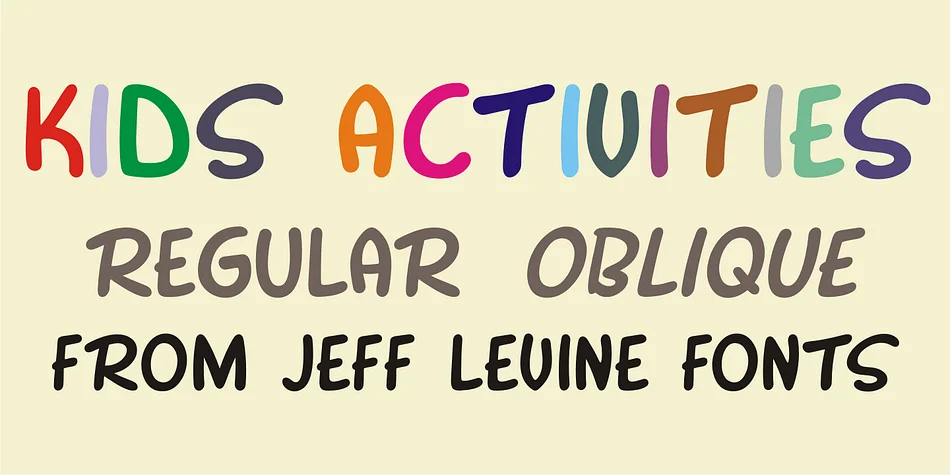
About KIDS ACTIVITIES JNL Font
KIDS ACTIVITIES JNL draws its spirited letterforms directly from hand-lettered covers found on 1955 Cub Scouts activity books, capturing that warm, energetic feel authentic to mid-century youth publications. Designed by Jeff Levine Fonts, this decorative typeface brings genuine playful confidence without the overstated cuteness that can make retro fonts feel dated or hollow. The letterforms carry real character that reads as fun and approachable, even when used at smaller sizes, and they avoid the self-conscious sweetness that undercuts authenticity.
This typeface excels for activity book layouts and illustrated worksheets, printed camp schedules and trip itineraries, vintage-inspired children's party invitations, and decorative playroom or classroom signage. It also works beautifully on scrapbooking spreads, youth group event posters, community program flyers, and the kind of nostalgic printed materials that still feel special in an increasingly digital world. Both regular and oblique versions let you add visual interest by varying emphasis or tilting key sections for dynamic flow. The letterforms stay readable at smaller sizes and pack more energy when used large.
Grab KIDS ACTIVITIES JNL from Creative Fabrica if you're designing print projects aimed at families, educators, or anyone chasing authentic 1950s scout-era charm. The typeface delivers that specific nostalgic moment without trying too hard, making it reliable for anyone seeking genuine vintage character in their work.
Style & Use Cases
- Overall Style
- Bold, Distinctive
- Use Case
- Headlines, Posters
- Ideal For
- logos, packaging, and standout titles
- Pairs With
- a neutral sans-serif
How to Install KIDS ACTIVITIES JNL Font
Step-by-step instructions for every platform
- 1Download the KIDS ACTIVITIES JNL font file (.ttf or .otf).
- 2Locate the downloaded file in your Downloads folder.
- 3Right-click the font file.
- 4Select "Install" to install for the current user, or "Install for all users" to make it available system-wide.
- 5KIDS ACTIVITIES JNL is now available in Word, Photoshop, Illustrator, and all other apps.
More by Jeff Levine Fonts
View all →



Browse fonts by theme
Curated collections →Saw a font in a picture? Identify any font from an image with our free Font Finder.
More Decorative Fonts
Browse all →







What pairs well with KIDS ACTIVITIES JNL Font?
KIDS ACTIVITIES JNL Font is a decorative font that shines as a display or heading face. Pair it with a clean sans-serif or serif font for body text — the contrast creates a clear hierarchy while the two styles stay balanced and easy to read.




KIDS ACTIVITIES JNL Font
Reviewed by the FontBoxDL team · Updated July 2026