 Firefox
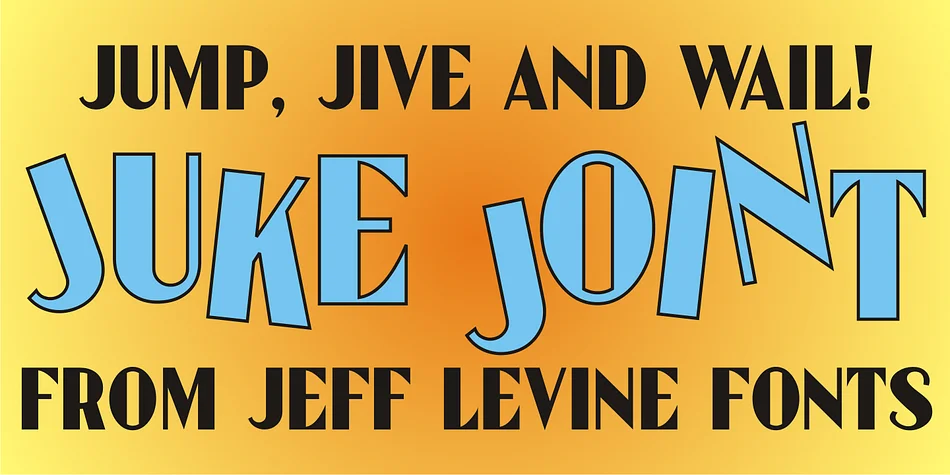
About JUKE JOINT JNL Font
JUKE JOINT JNL by Jeff Levine Fonts is a decorative typeface that captures the spirited energy of early-20th-century entertainment venues and nightlife culture. The design draws from the bold, charismatic lettering found on vintage sheet music covers and concert hall announcements, bringing that magnetic showmanship directly into contemporary design work.
This typeface excels in any project demanding genuine retro aesthetic punch. Picture it on jazz club menus and vintage bar signage, speakeasy-themed event graphics, or vintage record sleeve redesigns where bold, period-appropriate typography becomes essential. Prohibition-era brand identities and vintage festival branding are equally natural applications. The characters themselves are genuinely characterful: confident and ornamental yet readable across different sizes, they deliver strong decorative impact without sacrificing legibility or practical function.
Deploy it for craft brewery labels and packaging channeling a 1940s saloon aesthetic, vintage music event signage, or any project aiming to evoke a specific historical moment with visual authority. The font includes a full character set supporting standard Latin languages, giving you practical flexibility across varied applications and markets. When your next period-themed or retro-revival design needs authentic vintage personality and period-correct visual weight, grab JUKE JOINT JNL on Creative Fabrica.
Style & Use Cases
- Overall Style
- Bold, Distinctive
- Use Case
- Headlines, Posters
- Ideal For
- logos, packaging, and standout titles
- Pairs With
- a neutral sans-serif
How to Install JUKE JOINT JNL Font
Step-by-step instructions for every platform
- 1Download the JUKE JOINT JNL font file (.ttf or .otf).
- 2Locate the downloaded file in your Downloads folder.
- 3Right-click the font file.
- 4Select "Install" to install for the current user, or "Install for all users" to make it available system-wide.
- 5JUKE JOINT JNL is now available in Word, Photoshop, Illustrator, and all other apps.
More by Jeff Levine Fonts
View all →



Browse fonts by theme
Curated collections →Saw a font in a picture? Identify any font from an image with our free Font Finder.
More Decorative Fonts
Browse all →







What pairs well with JUKE JOINT JNL Font?
JUKE JOINT JNL Font is a decorative font that shines as a display or heading face. Pair it with a clean sans-serif or serif font for body text — the contrast creates a clear hierarchy while the two styles stay balanced and easy to read.




JUKE JOINT JNL Font
Reviewed by the FontBoxDL team · Updated June 2026