 Firefox
About Janice Font
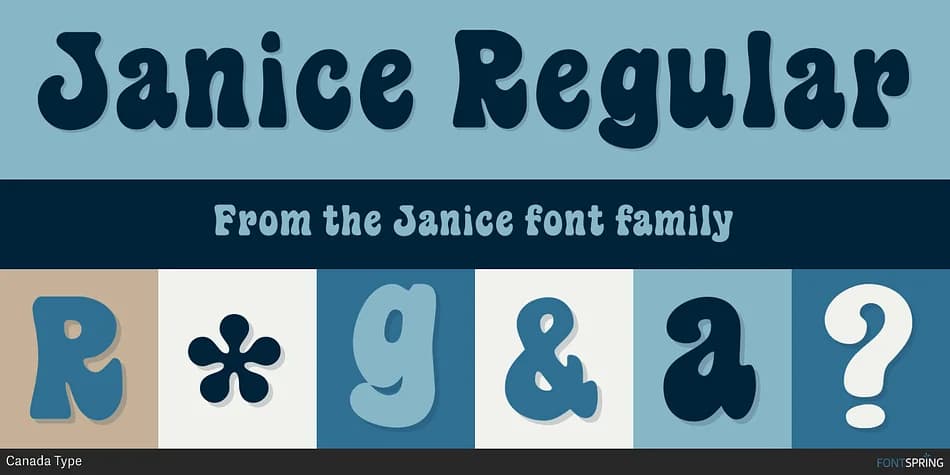
This typeface radiates the unbridled psychedelic energy of a generation that refused to be ordinary. Janice, designed by Canada Type, draws its visual language from a dusty 1970s photo type specimen that captured the raw, fearless spirit of an era defined by creative rebellion. Named after Janis Joplin, the iconic rock singer who embodied that same untamed energy, this font carries genuine personality that feels authentic rather than nostalgic-by-default.
What sets Janice apart is the full lowercase character set, giving you real design freedom instead of the limitations of headline-only typefaces. You'll find it works beautifully for vinyl record sleeve compositions, groovy music festival poster designs, artisan packaging labels seeking vintage warmth, and children's book covers that need character and soul. The organic, hand-drawn feel of each letterform brings period authenticity to projects without sacrificing readability. Whether you're evoking the 1970s or simply want design with genuine attitude, Janice delivers something that feels lived-in rather than imitated.
Pair Janice with a crisp, modern sans-serif for body text and supporting elements, which keeps layouts balanced and ensures longer passages remain accessible. Grab it on Creative Fabrica and let this throwback typeface bring some real groove to your next project.
Style & Use Cases
- Overall Style
- Bold, Distinctive
- Use Case
- Headlines, Posters
- Ideal For
- logos, packaging, and standout titles
- Pairs With
- a neutral sans-serif
How to Install Janice Font
Step-by-step instructions for every platform
- 1Download the Janice font file (.ttf or .otf).
- 2Locate the downloaded file in your Downloads folder.
- 3Right-click the font file.
- 4Select "Install" to install for the current user, or "Install for all users" to make it available system-wide.
- 5Janice is now available in Word, Photoshop, Illustrator, and all other apps.
More by Canada Type
View all →

Browse fonts by theme
Curated collections →Saw a font in a picture? Identify any font from an image with our free Font Finder.
More Decorative Fonts
Browse all →







What pairs well with Janice Font?
Janice Font is a decorative font that shines as a display or heading face. Pair it with a clean sans-serif or serif font for body text — the contrast creates a clear hierarchy while the two styles stay balanced and easy to read.



Janice Font
by Canada Type
Reviewed by the FontBoxDL team · Updated July 2026