 Firefox
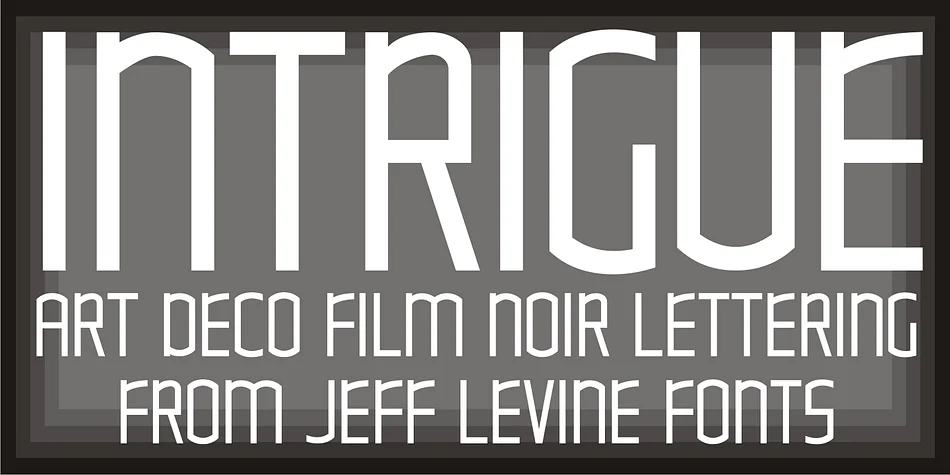
About INTRIGUE JNL Font
INTRIGUE JNL by Jeff Levine Fonts is a decorative typeface rooted in the hand-lettered title cards of Hollywood's golden age, specifically drawn from the iconic Thin Man film series. The design captures that glamorous Art Deco sensibility while simultaneously tapping into the retro futurism of 1980s design, making it surprisingly versatile across eras and aesthetic contexts.
This font works beautifully for vintage cinema posters, speakeasy and nightclub branding, retro event invitations, and product packaging that calls for old-Hollywood sophistication. The letterforms are confident and distinctive, with a theatrical presence that stands on its own. Period-authentic designs and eclectic mashups both benefit from Intrigue JNL's urbane character without ever reading as dated or costume-y. Display sizes are handled well, and legibility is maintained even when you push it to more experimental applications.
Its dual personality as both Art Deco artifact and synth-era nod means it plays equally well in classic revival designs and deliberately eclectic, mashup aesthetics. The interplay between its vintage cinema roots and modern retro sensibility makes it adaptable to everything from period pieces to contemporary work that just needs some cinematic flair. For designers working across periods and styles, that versatility is invaluable. Pick up INTRIGUE JNL on Creative Fabrica and bring some real intrigue to your next project.
Style & Use Cases
- Overall Style
- Bold, Distinctive
- Use Case
- Headlines, Posters
- Ideal For
- logos, packaging, and standout titles
- Pairs With
- a neutral sans-serif
How to Install INTRIGUE JNL Font
Step-by-step instructions for every platform
- 1Download the INTRIGUE JNL font file (.ttf or .otf).
- 2Locate the downloaded file in your Downloads folder.
- 3Right-click the font file.
- 4Select "Install" to install for the current user, or "Install for all users" to make it available system-wide.
- 5INTRIGUE JNL is now available in Word, Photoshop, Illustrator, and all other apps.
More by Jeff Levine Fonts
View all →



Browse fonts by theme
Curated collections →Saw a font in a picture? Identify any font from an image with our free Font Finder.
More Decorative Fonts
Browse all →







What pairs well with INTRIGUE JNL Font?
INTRIGUE JNL Font is a decorative font that shines as a display or heading face. Pair it with a clean sans-serif or serif font for body text — the contrast creates a clear hierarchy while the two styles stay balanced and easy to read.




INTRIGUE JNL Font
Reviewed by the FontBoxDL team · Updated June 2026