 Firefox
 1 / 6
1 / 6About Intertitle Nouveau JNL Font
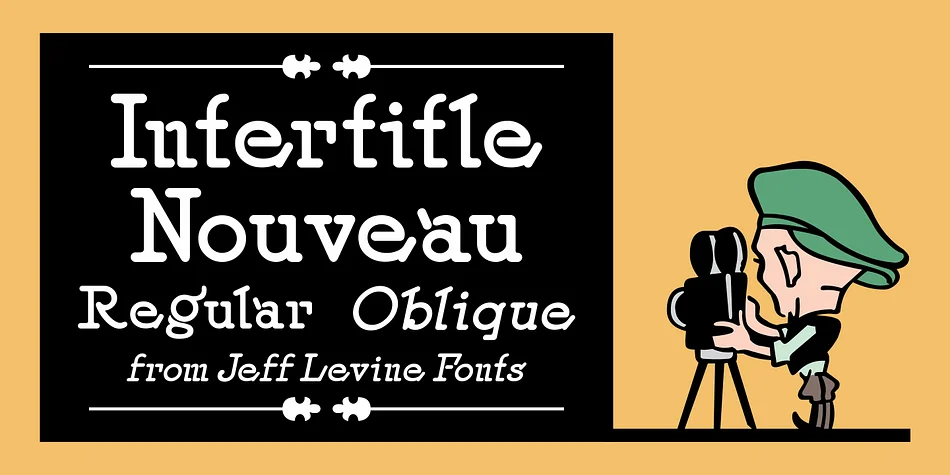
Intertitle Nouveau JNL by Jeff Levine Fonts is a decorative typeface built on early 20th-century hand lettering practice. The design draws from Samuel Welo's Studio Handbook for Artists and Advertisers, a foundational collection of hand-drawn alphabets that shaped both the sign trade and commercial design professions for decades. Using a typeface rooted in this kind of historical source material connects your work directly to how lettering artists actually approached their craft during the 1920s.
Originally created with a round lettering nib, this font carries a distinctly flowing, organic quality that feels genuinely hand-drawn rather than constructed. The characteristic rounded strokes are fundamental to its visual appeal and historical authenticity. It evokes the intertitle cards that appeared between scenes in silent films, a connection that makes it especially well-suited for period-accurate movie posters, vintage-inspired packaging for artisanal goods, retro book jacket designs, and 1920s-themed marketing campaigns. When you need authentic period aesthetics, that historical resonance gives your work immediate credibility and a sense of genuine character. Both regular and oblique versions are available, offering you flexibility to match different design directions and visual moods.
Find Intertitle Nouveau JNL on Creative Fabrica and add these authentic vintage letterforms to your design toolkit.
Style & Use Cases
- Overall Style
- Bold, Distinctive
- Use Case
- Headlines, Posters
- Ideal For
- logos, packaging, and standout titles
- Pairs With
- a neutral sans-serif
How to Install Intertitle Nouveau JNL Font
Step-by-step instructions for every platform
- 1Download the Intertitle Nouveau JNL font file (.ttf or .otf).
- 2Locate the downloaded file in your Downloads folder.
- 3Right-click the font file.
- 4Select "Install" to install for the current user, or "Install for all users" to make it available system-wide.
- 5Intertitle Nouveau JNL is now available in Word, Photoshop, Illustrator, and all other apps.
More by Jeff Levine Fonts
View all →



Browse fonts by theme
Curated collections →Saw a font in a picture? Identify any font from an image with our free Font Finder.
More Decorative Fonts
Browse all →







What pairs well with Intertitle Nouveau JNL Font?
Intertitle Nouveau JNL Font is a decorative font that shines as a display or heading face. Pair it with a clean sans-serif or serif font for body text — the contrast creates a clear hierarchy while the two styles stay balanced and easy to read.




Intertitle Nouveau JNL Font
Reviewed by the FontBoxDL team · Updated June 2026