
 1 / 7
1 / 7About InKing Font
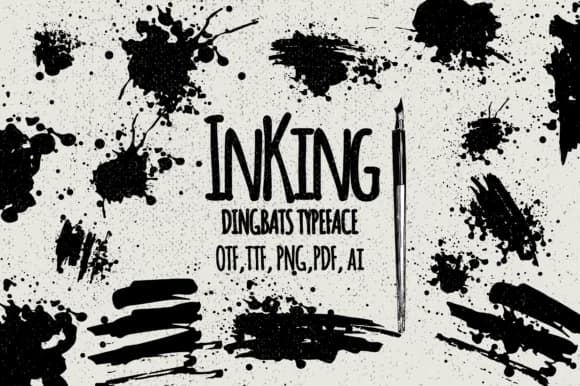
InKing radiates raw, energetic chaos in the best way, like watching ink bleed across rough paper. Designed by Minimalistartstudio, this dingbats font channels the visual vocabulary of ink splashes and brushwork into something genuinely useful for designers seeking texture and movement in their layouts.
The collection thrives whenever you need organic, handmade quality that other fonts simply can't replicate. Visualize it in vintage band posters layered with graffiti-style elements, DIY sticker designs where imperfection becomes genuine character, or edgy wedding invitations that deliberately break from stuffy convention. The brush-stroke glyphs and ink-drop shapes work equally well as focal points in zine layouts, as splatter overlays building atmospheric depth, or scattered as texture elements throughout your typography. You can layer multiple characters together to create composite shapes and textures, or use individual glyphs as design accents. Each mark carries that authentic, unpolished quality that feels intentional rather than accidentally rough, which is harder to achieve than it sounds. The font works best when you want visual imperfection to feel like a design choice, not a limitation.
Pair InKing with a clean, geometric sans-serif when you need contrast and legibility. The combination lets the dingbats shine while keeping everything visually balanced. You'll find InKing on Creative Fabrica, ready to inject hand-drawn intensity into your next project.
Style & Use Cases
- Overall Style
- Iconographic, Ink
- Use Case
- Icons, Accents
- Ideal For
- ornaments, bullets, and decorative flourishes
- Pairs With
- any text font
How to Install InKing Font
Step-by-step instructions for every platform
- 1Download the InKing font file (.ttf or .otf).
- 2Locate the downloaded file in your Downloads folder.
- 3Right-click the font file.
- 4Select "Install" to install for the current user, or "Install for all users" to make it available system-wide.
- 5InKing is now available in Word, Photoshop, Illustrator, and all other apps.
More by Minimalistartstudio
View all →



Browse fonts by theme
Curated collections →Saw a font in a picture? Identify any font from an image with our free Font Finder.
More Dingbats Fonts
Browse all →







What pairs well with InKing Font?
InKing Font is a versatile dingbats font that works for both headings and body text. Pair it with a contrasting sans-serif or serif font to add visual interest and a clear distinction between titles and body copy.



InKing Font
Reviewed by the FontBoxDL team · Updated July 2026