 Firefox
 1 / 6
1 / 6About Imperial Granum Font
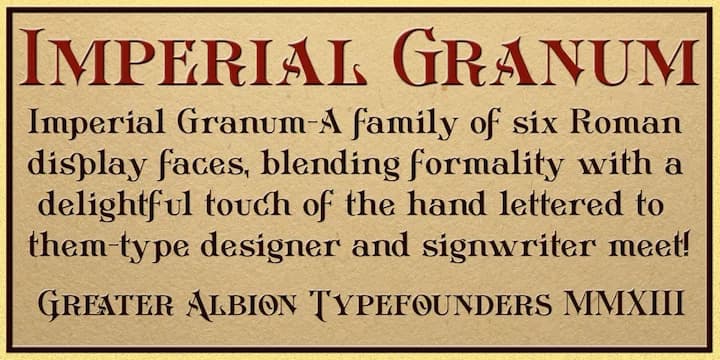
Picture a vintage label for artisanal jam, hand-lettered with old-world charm and care. Imperial Granum, designed by Greater Albion Typefounders, brings exactly that sensibility to your digital designs. This decorative face draws from early 20th-century food advertising lettering, marrying formal elegance with the looser, more personal feel of Arts and Crafts handwork.
The font's structure makes it wonderfully flexible to work with. You get three complete typeface variations: a regular face with small capitals in two distinct sizes, an ornamental version for capitals only, and a minuscule form designed to layer with the others. That depth means vintage food packaging, wedding invitation suites, and luxury product labels all become natural places for this typeface. Specialty menu design, heritage tea boxes, and apothecary packaging all benefit from the Edwardian aesthetic it carries without ever feeling forced or overdone.
Each form ships in regular and bold weights, giving you real range without losing the font's distinctive character. The small capitals system works especially well at large sizes, where Imperial Granum's hand-drawn quality reads with genuine personality. Get it on Creative Fabrica and add this typeface to your library, knowing you've got a design that feels like it stepped straight from a 1920s type specimen book.
Style & Use Cases
- Overall Style
- Bold, Distinctive
- Use Case
- Headlines, Posters
- Ideal For
- logos, packaging, and standout titles
- Pairs With
- a neutral sans-serif
How to Install Imperial Granum Font
Step-by-step instructions for every platform
- 1Download the Imperial Granum font file (.ttf or .otf).
- 2Locate the downloaded file in your Downloads folder.
- 3Right-click the font file.
- 4Select "Install" to install for the current user, or "Install for all users" to make it available system-wide.
- 5Imperial Granum is now available in Word, Photoshop, Illustrator, and all other apps.
More by Greater Albion Typefounders
View all →
Browse fonts by theme
Curated collections →Saw a font in a picture? Identify any font from an image with our free Font Finder.
More Decorative Fonts
Browse all →







What pairs well with Imperial Granum Font?
Imperial Granum Font is a decorative font that shines as a display or heading face. Pair it with a clean sans-serif or serif font for body text — the contrast creates a clear hierarchy while the two styles stay balanced and easy to read.



Imperial Granum Font
by Greater Albion Typefounders
Reviewed by the FontBoxDL team · Updated June 2026