 Firefox
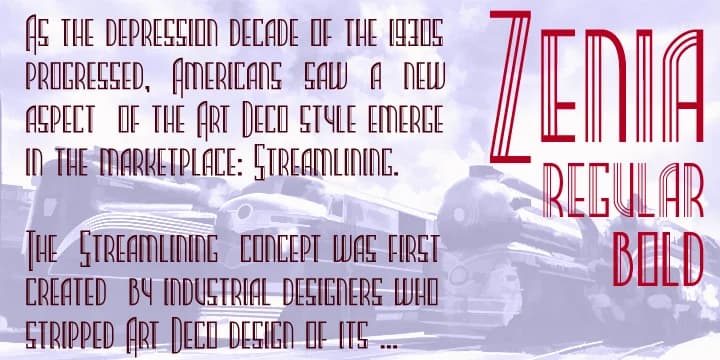
About Zenia Font
Zenia draws its visual language from 1930s design, combining smooth curves with sharp angles in a careful balance that reads as both ornamental and purposeful. Greater Albion Typefounders built this display family from the aerodynamic sensibilities of that era, keeping every letter clear and functional even as the face sings with personality. Regular and bold weights give you the range you need without diluting the typeface's unmistakable visual voice.
Put it to work on art deco posters, retro sci-fi book covers, vintage speakeasy branding, and 1930s-themed event invitations. It handles boutique hotel marquees, jazz club promotions, period-accurate diner signage, and antique shop window lettering with equal ease. The typeface builds real presence, working just as well for historically accurate recreation as for contemporary projects that reference the era as inspiration. That balance between polish and personality means it can anchor anything from a vintage brand system to a single piece of promotional work.
Built for designers and makers hunting for that specific design moment without falling into heavy pastiche. This typeface pairs equally well with a complete vintage brand system or a single moment on promotional material. Get Zenia on Creative Fabrica and bring its geometric confidence to your next design project.
Style & Use Cases
- Overall Style
- Bold, Distinctive
- Use Case
- Headlines, Posters
- Ideal For
- logos, packaging, and standout titles
- Pairs With
- a neutral sans-serif
How to Install Zenia Font
Step-by-step instructions for every platform
- 1Download the Zenia font file (.ttf or .otf).
- 2Locate the downloaded file in your Downloads folder.
- 3Right-click the font file.
- 4Select "Install" to install for the current user, or "Install for all users" to make it available system-wide.
- 5Zenia is now available in Word, Photoshop, Illustrator, and all other apps.
More by Greater Albion Typefounders
View all →

Browse fonts by theme
Curated collections →Saw a font in a picture? Identify any font from an image with our free Font Finder.
More Decorative Fonts
Browse all →







What pairs well with Zenia Font?
Zenia Font is a decorative font that shines as a display or heading face. Pair it with a clean sans-serif or serif font for body text — the contrast creates a clear hierarchy while the two styles stay balanced and easy to read.



Zenia Font
by Greater Albion Typefounders
Reviewed by the FontBoxDL team · Updated June 2026