
 1 / 8
1 / 8About Hovercity Font
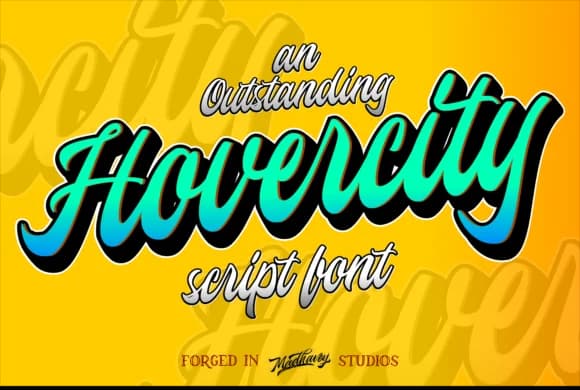
This script commands attention from the moment you see it on the page. Hovercity, designed by madhavey, is a bold flowing typeface built to make a genuine statement and turn heads in any composition.
The font thrives wherever visual weight and personality need to take center stage in your design. Think ornate wedding invitation suites with layered decorative detail, event posters and ticket designs for galas or festivals, luxury boutique branding for skincare lines and jewelry shops, hand-lettered signage for craft studios and artisan workshops, or labels for specialty food, beverage, or artisanal product packaging. The typeface carries strong personality in every letterform, naturally becoming the focal point of your layout. It's the kind of script that anchors a design around its confident strokes and generous curves rather than supporting a headline from the background.
Pair Hovercity with a clean, minimal sans-serif for body text and smaller supporting details. This pairing creates breathing room and ensures readability without the sans-serif competing with the script's boldness. The contrast between the two keeps your composition grounded while letting the script command the attention it deserves. You'll find Hovercity on Creative Fabrica, ready to add distinctive, memorable character to any project that demands real visual impact.
Style & Use Cases
- Overall Style
- Elegant, Flowing, Hovercity
- Use Case
- Invitations, Branding
- Ideal For
- wedding stationery, greeting cards, and signatures
- Pairs With
- a simple uppercase sans
How to Install Hovercity Font Font
Step-by-step instructions for every platform
- 1Download the Hovercity Font font file (.ttf or .otf).
- 2Locate the downloaded file in your Downloads folder.
- 3Right-click the font file.
- 4Select "Install" to install for the current user, or "Install for all users" to make it available system-wide.
- 5Hovercity Font is now available in Word, Photoshop, Illustrator, and all other apps.
More by madhavey
View all →
More Script Handwritten Fonts
Browse all →







What pairs well with Hovercity Font?
Hovercity Font is a script font that shines as a display or heading face. Pair it with a clean sans-serif or serif font for body text — the contrast creates a clear hierarchy while the two styles stay balanced and easy to read.



Hovercity Font
by madhavey
Reviewed by the FontBoxDL team · Updated May 2026