 Firefox
 1 / 5
1 / 5About HOLLYWOOD AND VINE JNL Font
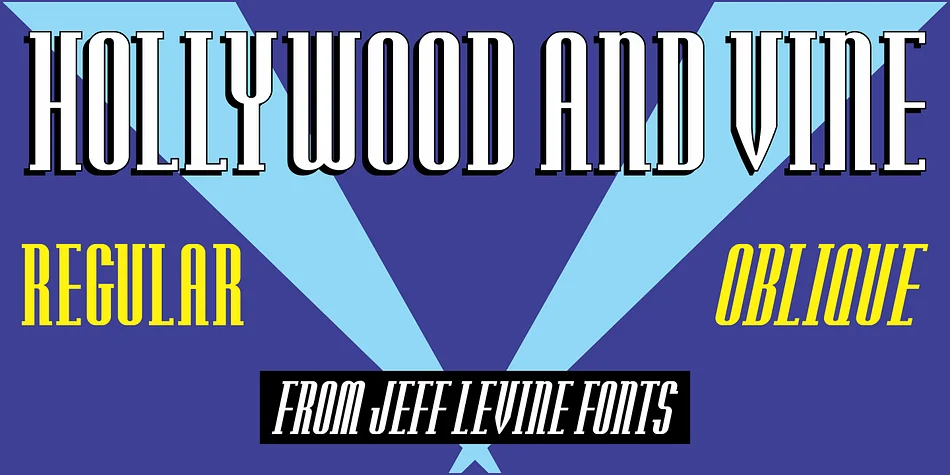
Picture designing a supper club menu from 1938 or a vintage jazz festival poster that needs authentic period elegance. Hollywood and Vine JNL by Jeff Levine Fonts brings that exact aesthetic to life with a crisp, condensed Art Deco typeface built from angular geometry and tight spacing. Named after the famous Hollywood and Vine intersection, this typeface carries the genuine visual language of vintage Tinseltown.
Originally designed as a title font for a February 1938 issue of Modern Screen Magazine, this typeface has earned its place in design history. The condensed form and high-contrast letterforms work beautifully for art deco event invitations, retro theater program covers, vintage cocktail lounge signage, and period-accurate record album artwork. What made it effective then still applies now: the tight tracking and angular cuts create visual drama without consuming precious horizontal space, making it ideal for both display work and tight text layouts.
You get both regular and oblique versions, giving you the choice between straight-edged boldness or a subtle forward lean for visual variety. At display sizes, the angular geometry really shines, bringing these letterforms to life with genuine visual impact. Find it on Creative Fabrica and add this piece of design history to your creative toolkit.
Style & Use Cases
- Overall Style
- Bold, Distinctive
- Use Case
- Headlines, Posters
- Ideal For
- logos, packaging, and standout titles
- Pairs With
- a neutral sans-serif
How to Install HOLLYWOOD AND VINE JNL Font
Step-by-step instructions for every platform
- 1Download the HOLLYWOOD AND VINE JNL font file (.ttf or .otf).
- 2Locate the downloaded file in your Downloads folder.
- 3Right-click the font file.
- 4Select "Install" to install for the current user, or "Install for all users" to make it available system-wide.
- 5HOLLYWOOD AND VINE JNL is now available in Word, Photoshop, Illustrator, and all other apps.
More by Jeff Levine Fonts
View all →



Browse fonts by theme
Curated collections →Saw a font in a picture? Identify any font from an image with our free Font Finder.
More Decorative Fonts
Browse all →







What pairs well with HOLLYWOOD AND VINE JNL Font?
HOLLYWOOD AND VINE JNL Font is a decorative font that shines as a display or heading face. Pair it with a clean sans-serif or serif font for body text — the contrast creates a clear hierarchy while the two styles stay balanced and easy to read.




HOLLYWOOD AND VINE JNL Font
Reviewed by the FontBoxDL team · Updated June 2026