 Firefox
 1 / 8
1 / 8Loading font…
About Hibiscus Font
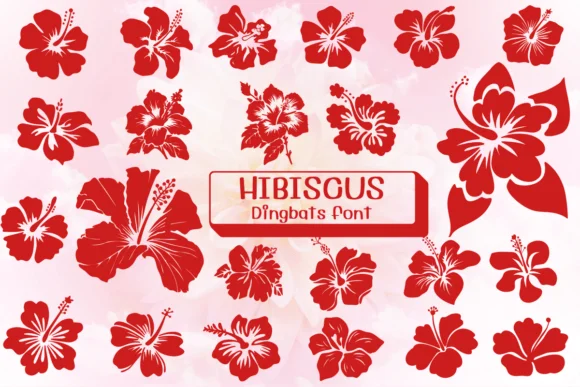
Imagine you're designing a wedding invitation suite with that island-getaway feel, and you want each detail to whisper tropical luxury instead of shouting it. Hibiscus, created by Ketsarin, gives you exactly that through a collection of dingbat characters where every letter is actually a differently rendered hibiscus bloom. Rather than using solid icons, the font offers outlined and colored variations of each flower, letting you adapt them to your invitation's color scheme or layer them as design elements across your layouts.
This font shines in wedding stationery, tropical event flyers, and boutique spa packaging where the florals need to feel authentic without losing their modern edge. Etsy sellers building botanical product labels, greeting card designers, and DIY crafters making scrapbook pages will find the blossoms stack naturally and compose without looking forced. The file comes in both OTF and TTF, playing nicely with Procreate, Affinity Designer, and Affinity Photo so you can work across iPad or desktop without friction.
The real strength sits in scale: these blooms read as full design elements at large sizes, not just background decoration. One more thing to note is how the line-work holds up when enlarged, making it ideal for print applications where clarity matters. Get it on Creative Fabrica and start weaving these florals into your next design.
Style & Use Cases
- Overall Style
- Iconographic, Fonts
- Use Case
- Icons, Accents
- Ideal For
- ornaments, bullets, and decorative flourishes
- Pairs With
- any text font
How to Install Hibiscus Font
Step-by-step instructions for every platform
- 1Download the Hibiscus font file (.ttf or .otf).
- 2Locate the downloaded file in your Downloads folder.
- 3Right-click the font file.
- 4Select "Install" to install for the current user, or "Install for all users" to make it available system-wide.
- 5Hibiscus is now available in Word, Photoshop, Illustrator, and all other apps.
More by Ketsarin
View all →
Browse fonts by theme
Curated collections →Saw a font in a picture? Identify any font from an image with our free Font Finder.
More Dingbats Fonts
Browse all →







What pairs well with Hibiscus Font?
Hibiscus Font is a versatile dingbats font that works for both headings and body text. Pair it with a contrasting sans-serif or serif font to add visual interest and a clear distinction between titles and body copy.




Hibiscus Font
by Ketsarin
Reviewed by the FontBoxDL team · Updated October 2026