 Firefox
 1 / 8
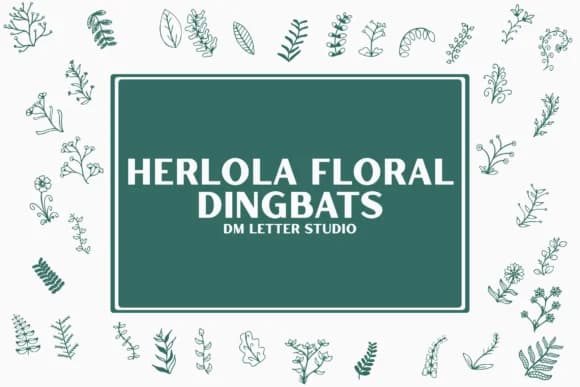
1 / 8About Herlora Floral Dingbat Font
You're laying out a wedding suite and realize you need delicate leaf elements between the text without hunting for clipart or sketching flourishes by hand. Herlora Floral Dingbat, designed by Sharon at DmStudio, gives you exactly this: botanical ornaments you type directly into your layout. The dingbat ships with 40+ hand-drawn floral icons and wreath elements, all as clean vector outlines that scale crisply at any size.
This works wonderfully for wedding invitation suites where small leaf accents carry visual weight, save-the-date cards with wreath borders, or greeting card designs that need botanical texture without feeling busy. Boutique product packaging (cosmetics, tea, honey labels) often calls for exactly this kind of organic touch. Planner spreads and DIY stationery designs benefit from having stems, flowers, and leaf clusters right there in the font; no assembly required.
The icons come as vector shapes, so they cut clean in cutting machines and print sharp whether you're using them at body size or scaled large across a poster. Since everything maps to standard keyboard characters, workflow is straightforward: just type and adjust kerning as usual. You'll find Herlora Floral Dingbat available on Creative Fabrica, ready to add that botanical flourish to your next project.
Style & Use Cases
- Overall Style
- Iconographic, Herlora Floral Dingbat
- Use Case
- Icons, Accents
- Ideal For
- ornaments, bullets, and decorative flourishes
- Pairs With
- any text font
How to Install Herlora Floral Dingbat Font
Step-by-step instructions for every platform
- 1Download the Herlora Floral Dingbat font file (.ttf or .otf).
- 2Locate the downloaded file in your Downloads folder.
- 3Right-click the font file.
- 4Select "Install" to install for the current user, or "Install for all users" to make it available system-wide.
- 5Herlora Floral Dingbat is now available in Word, Photoshop, Illustrator, and all other apps.
More by Sharon ( DmStudio )
View all →
Browse fonts by theme
Curated collections →Saw a font in a picture? Identify any font from an image with our free Font Finder.
More Dingbats Fonts
Browse all →







What pairs well with Herlora Floral Dingbat Font?
Herlora Floral Dingbat Font is a versatile dingbats font that works for both headings and body text. Pair it with a contrasting sans-serif or serif font to add visual interest and a clear distinction between titles and body copy.



Herlora Floral Dingbat Font
Reviewed by the FontBoxDL team · Updated June 2026