 Firefox
 1 / 5
1 / 5About HEADLINE NOUVEAU JNL Font
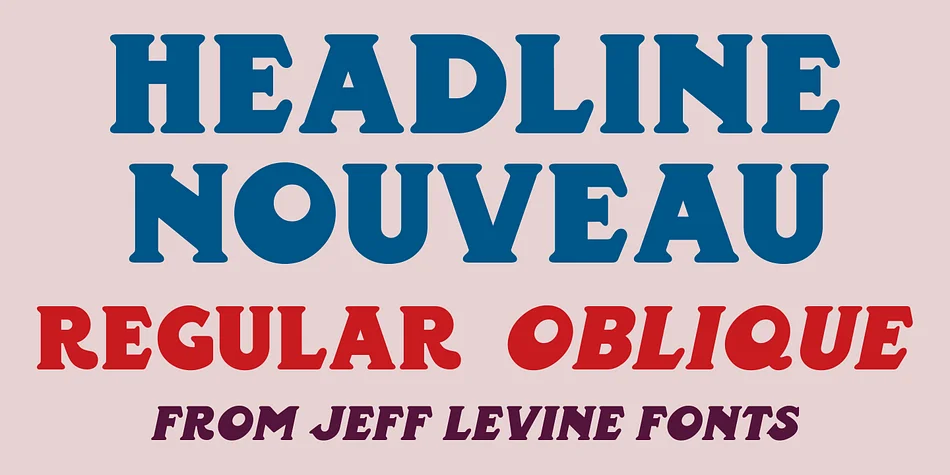
The blocky, purposeful strokes of this typeface draw directly from early 1890s Art Nouveau book titling, complete with those signature rounded serifs that soften classical letterforms without losing their weight. Designer Jeff Levine captured that distinctive hand-lettered quality in Headline Nouveau JNL, turning the visual confidence of period typography into something you can actually use today. Both the extra bold weight and the oblique version come included, letting you pick between upright and angled depending on what your design calls for.
You'll find this works especially well for wedding invitations, vintage concert posters, or sophisticated product labels for upscale cosmetic lines. Book cover design benefits from its presence, while jewelry brand identities or specialty coffee bag packaging respond well to the typeface's assertive character. The rounded serifs give it just enough softness to avoid feeling too industrial, which matters when you're reaching for something that reads both classic and accessible.
This is the font for designers building work that needs historical depth without feeling like a museum piece. Grab Headline Nouveau JNL on Creative Fabrica whenever you need that 1890s Art Nouveau aesthetic in your toolkit.
Style & Use Cases
- Overall Style
- Bold, Distinctive
- Use Case
- Headlines, Posters
- Ideal For
- logos, packaging, and standout titles
- Pairs With
- a neutral sans-serif
How to Install HEADLINE NOUVEAU JNL Font
Step-by-step instructions for every platform
- 1Download the HEADLINE NOUVEAU JNL font file (.ttf or .otf).
- 2Locate the downloaded file in your Downloads folder.
- 3Right-click the font file.
- 4Select "Install" to install for the current user, or "Install for all users" to make it available system-wide.
- 5HEADLINE NOUVEAU JNL is now available in Word, Photoshop, Illustrator, and all other apps.
More by Jeff Levine Fonts
View all →



Browse fonts by theme
Curated collections →Saw a font in a picture? Identify any font from an image with our free Font Finder.
More Decorative Fonts
Browse all →







What pairs well with HEADLINE NOUVEAU JNL Font?
HEADLINE NOUVEAU JNL Font is a decorative font that shines as a display or heading face. Pair it with a clean sans-serif or serif font for body text — the contrast creates a clear hierarchy while the two styles stay balanced and easy to read.




HEADLINE NOUVEAU JNL Font
Reviewed by the FontBoxDL team · Updated June 2026