
 1 / 8
1 / 8About Hats Font
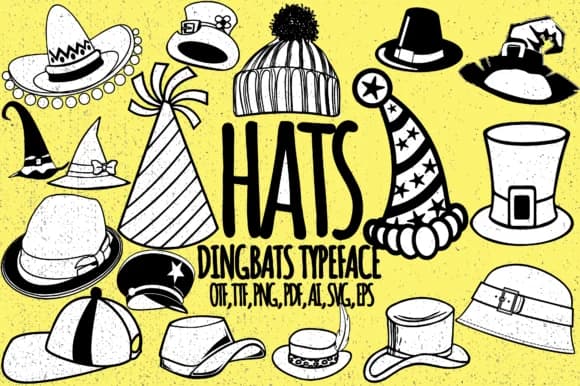
Each keystroke generates a fresh hat illustration, making character input feel like selecting from a gallery of headwear styles. Hats, created by Minimalistartstudio, is a dingbats font that replaces standard letters and numbers with dozens of silhouettes spanning classic and contemporary hat designs. The collection ranges from formal fedoras and top hats to casual caps and beanies, each meticulously crafted and rendered as a complete, usable glyph that maintains consistent visual weight and proportions across your designs.
For fashion-focused designers and illustrators, these hat silhouettes integrate beautifully into multiple project types. Think boutique clothing brand social media graphics, vintage style mood boards, greeting card suites for hat lovers, and DIY fashion lookbooks. The glyphs work equally well as printed stickers for retail packaging and hat shop labels, web icons for fashion blogs and e-commerce sites, or decorative embellishments for planner layouts and scrapbooking projects. Anyone building millinery-related content or adding playful visual character to fashion publications will appreciate the range available.
This font serves designers and brands creating hat-focused or fashion-driven work, from indie milliners and clothing labels to professionals seeking quick, polished illustration solutions without investing time in custom artwork. Find Hats on Creative Fabrica and streamline your visual development with this ready-made collection.
Style & Use Cases
- Overall Style
- Iconographic, Hat
- Use Case
- Icons, Accents
- Ideal For
- ornaments, bullets, and decorative flourishes
- Pairs With
- any text font
How to Install Hats Font
Step-by-step instructions for every platform
- 1Download the Hats font file (.ttf or .otf).
- 2Locate the downloaded file in your Downloads folder.
- 3Right-click the font file.
- 4Select "Install" to install for the current user, or "Install for all users" to make it available system-wide.
- 5Hats is now available in Word, Photoshop, Illustrator, and all other apps.
More by Minimalistartstudio
View all →



Browse fonts by theme
Curated collections →Saw a font in a picture? Identify any font from an image with our free Font Finder.
More Dingbats Fonts
Browse all →







What pairs well with Hats Font?
Hats Font is a versatile dingbats font that works for both headings and body text. Pair it with a contrasting sans-serif or serif font to add visual interest and a clear distinction between titles and body copy.



Hats Font
Reviewed by the FontBoxDL team · Updated July 2026