 Firefox
 1 / 8
1 / 8About Hand Drawn Vintage Font
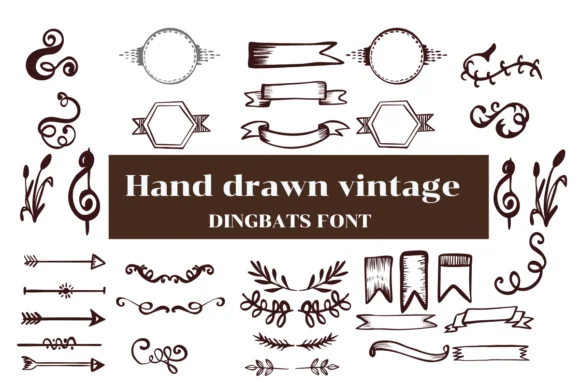
Hand Drawn Vintage is a dingbat collection by Nongyao built from a comprehensive library of ornamental flourishes and decorative marks with a distinctly retro character. Rather than a traditional typeface, this is a toolkit of hand-drawn elements that brings authentic vintage sensibility to your design work. The collection includes decorative borders, ornamental frames, flowing flourishes, dimensional doodle marks, and pattern elements that all retain that genuinely sketched quality throughout. It's offered in both OTF and TTF formats so you can use the elements across Procreate, Affinity Designer, and Affinity Photo.
The font excels when vintage texture genuinely matters to your project. Wedding invitation suites benefit enormously from its layered ornamental frames and period-appropriate detailing. Vintage greeting cards come alive with hand-drawn borders that digital decoration typically can't match. Scrapbooking layouts that call for nostalgic elements find everything they need within this collection. Retro restaurant menus and vintage-styled stationery gain that handcrafted detail which signals quality to viewers. Each individual mark carries hand-rendered substance, something that reads immediately as intentional craft rather than a digital convenience.
This collection suits designers and makers who want authentic ornamental texture without building every flourish from scratch themselves. Find Hand Drawn Vintage on Creative Fabrica to add genuine vintage character and ornamental richness to your next decorative project.
Style & Use Cases
- Overall Style
- Iconographic, Fonts
- Use Case
- Icons, Accents
- Ideal For
- ornaments, bullets, and decorative flourishes
- Pairs With
- any text font
How to Install Hand Drawn Vintage Font
Step-by-step instructions for every platform
- 1Download the Hand Drawn Vintage font file (.ttf or .otf).
- 2Locate the downloaded file in your Downloads folder.
- 3Right-click the font file.
- 4Select "Install" to install for the current user, or "Install for all users" to make it available system-wide.
- 5Hand Drawn Vintage is now available in Word, Photoshop, Illustrator, and all other apps.




Browse fonts by theme
Curated collections →Saw a font in a picture? Identify any font from an image with our free Font Finder.
More Dingbats Fonts
Browse all →







What pairs well with Hand Drawn Vintage Font?
Hand Drawn Vintage Font is a versatile dingbats font that works for both headings and body text. Pair it with a contrasting sans-serif or serif font to add visual interest and a clear distinction between titles and body copy.




Hand Drawn Vintage Font
by Nongyao
Reviewed by the FontBoxDL team · Updated July 2026