 Firefox
 1 / 8
1 / 8Loading font…
About Hand Draw Font
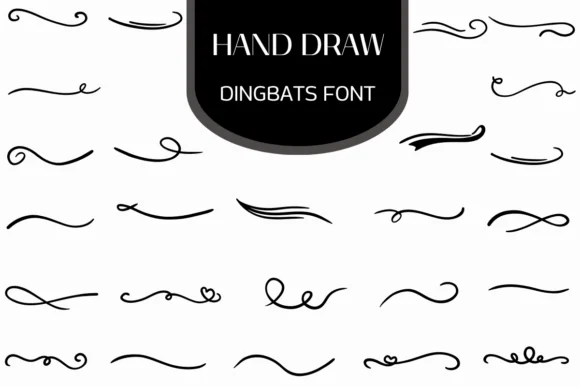
Hand Draw by Heartcraft Atelier is a dingbat collection built on organic, sketchy linework that captures the actual texture of pen and brush marks. Its rough strokes and freehand quality give designs an instantly handmade feel, setting it apart from slick, computer-generated decoration fonts.
This utility font loads a range of swirls, flourishes, heart accents, and ornamental marks that work as dividers, corner elements, underline accents, and text embellishments. Because the hand-drawn stroke quality reads as genuine craft rather than a filtered imitation, it works exceptionally well for wedding invitation suites, artisan product labels and packaging, greeting card embellishments, and personalized stationery design. Scrapbooking layouts, DIY craft projects, boutique package inserts, and hand-lettered work all benefit from its cohesive artistic voice. The marks look natural enough to pass as sketches, not just decorative symbols.
The collection is built for designers and makers who want their typography to feel personal and sketched rather than polished or corporate. Hand Draw shines best when you're after a warm, artisanal vibe in wedding designs, custom packaging, craft-focused work, or any project where the handmade aesthetic is the actual goal. Find this font on Creative Fabrica to start adding that sketched quality to your next design.
Style & Use Cases
- Overall Style
- Iconographic, Affinity Font
- Use Case
- Icons, Accents
- Ideal For
- ornaments, bullets, and decorative flourishes
- Pairs With
- any text font
How to Install Hand Draw Font
Step-by-step instructions for every platform
- 1Download the Hand Draw font file (.ttf or .otf).
- 2Locate the downloaded file in your Downloads folder.
- 3Right-click the font file.
- 4Select "Install" to install for the current user, or "Install for all users" to make it available system-wide.
- 5Hand Draw is now available in Word, Photoshop, Illustrator, and all other apps.
More by Heartcraft Atelier
View all →



Browse fonts by theme
Curated collections →Saw a font in a picture? Identify any font from an image with our free Font Finder.
More Dingbats Fonts
Browse all →







What pairs well with Hand Draw Font?
Hand Draw Font is a versatile dingbats font that works for both headings and body text. Pair it with a contrasting sans-serif or serif font to add visual interest and a clear distinction between titles and body copy.




Hand Draw Font
Reviewed by the FontBoxDL team · Updated October 2026