 Firefox
 1 / 8
1 / 8About Halloween Doodle Font
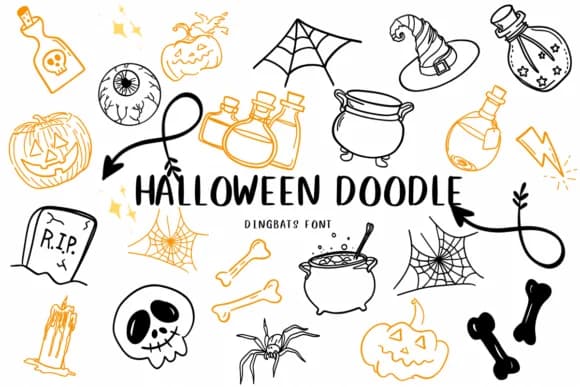
You're designing Halloween party invitations and need quick access to spooky illustrations without hunting through separate icon packs. Halloween Doodle by CHANOK is a dingbats font where each key press triggers a different hand-drawn icon, so you can build your entire October aesthetic through type. The collection spans the full range of seasonal characters: pumpkins, cauldrons, bats, skulls, witch hats, bones, ghosts, cats, and more, all with that sketchy, imperfect charm that makes Halloween graphics feel authentic rather than mass-produced.
This works particularly well for DIY Halloween party invitations, Etsy shop stickers and labels, haunted house attraction posters, and trick-or-treat bag designs. The icons render clean and readable at large sizes, which keeps your designs legible whether you're working at headline scale or creating small label graphics for printed goods. You get the complete set of spooky characters in a single font file, so there's no fussing with multiple resources, layer management, or compatibility issues. Since these are proper Unicode glyphs, they scale infinitely and print as sharp vectors, making this a practical choice for everything from digital mockups to professional print production.
Find Halloween Doodle on Creative Fabrica and get started on your seasonal projects.
Style & Use Cases
- Overall Style
- Iconographic, Halloween
- Use Case
- Icons, Accents
- Ideal For
- ornaments, bullets, and decorative flourishes
- Pairs With
- any text font
How to Install Halloween Doodle Font
Step-by-step instructions for every platform
- 1Download the Halloween Doodle font file (.ttf or .otf).
- 2Locate the downloaded file in your Downloads folder.
- 3Right-click the font file.
- 4Select "Install" to install for the current user, or "Install for all users" to make it available system-wide.
- 5Halloween Doodle is now available in Word, Photoshop, Illustrator, and all other apps.
More by CHANOK
View all →
Browse fonts by theme
Curated collections →Saw a font in a picture? Identify any font from an image with our free Font Finder.
More Dingbats Fonts
Browse all →







What pairs well with Halloween Doodle Font?
Halloween Doodle Font is a versatile dingbats font that works for both headings and body text. Pair it with a contrasting sans-serif or serif font to add visual interest and a clear distinction between titles and body copy.



Halloween Doodle Font
by CHANOK
Reviewed by the FontBoxDL team · Updated June 2026