 Firefox
 1 / 8
1 / 8About Halloween Font
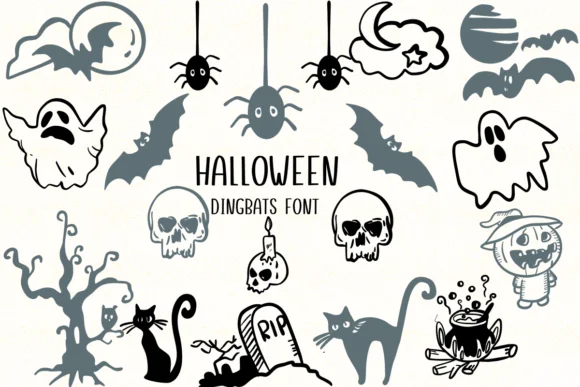
Halloween is a dingbat collection featuring hand-drawn illustrations that bring classic spooky character to the table. Designed by Nongyao, the font replaces standard letterforms with a carefully crafted set of Halloween icons rendered in a retro style with subtle texture throughout. You get the expected cast: grinning jack-o'-lanterns, witch hats, skulls, candy corn, and haunted silhouettes that feel more character-driven than generic symbol fonts.
The outline-style characters make this set particularly useful when layering colors, adding fill effects, or building designs where you need the illustrations to hold their own visually. It's built for Halloween party invitations where you want instant seasonal polish, DIY costume label stickers that feel handmade, seasonal event posters with real personality, and themed merchandise graphics for boutique apparel or gift boxes. Available in both OTF and TTF formats, the font works across Silhouette studio, Affinity Designer, Procreate, and standard print applications without compatibility hassles.
This font works best for anyone creating Halloween retail packaging, printed event materials, craft project layouts, or decorative signage. The collection sits nicely between pure doodle and structured symbol set, giving your work that nostalgic homemade feel without sacrificing polish. Find it on Creative Fabrica to start layering these retro-spooky illustrations into your seasonal designs.
Style & Use Cases
- Overall Style
- Iconographic, Fonts
- Use Case
- Icons, Accents
- Ideal For
- ornaments, bullets, and decorative flourishes
- Pairs With
- any text font
How to Install Halloween Font
Step-by-step instructions for every platform
- 1Download the Halloween font file (.ttf or .otf).
- 2Locate the downloaded file in your Downloads folder.
- 3Right-click the font file.
- 4Select "Install" to install for the current user, or "Install for all users" to make it available system-wide.
- 5Halloween is now available in Word, Photoshop, Illustrator, and all other apps.




Browse fonts by theme
Curated collections →Saw a font in a picture? Identify any font from an image with our free Font Finder.
More Dingbats Fonts
Browse all →







What pairs well with Halloween Font?
Halloween Font is a versatile dingbats font that works for both headings and body text. Pair it with a contrasting sans-serif or serif font to add visual interest and a clear distinction between titles and body copy.




Halloween Font
by Nongyao
Reviewed by the FontBoxDL team · Updated July 2026