 Firefox
 1 / 8
1 / 8About Gun Set Font
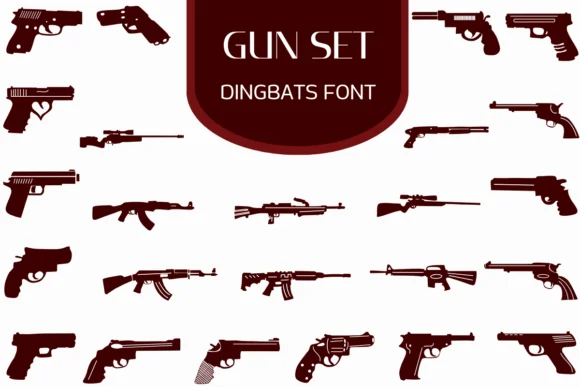
Gun Set by Heartcraft Atelier is a dingbats typeface built from sharp silhouettes of firearms, spanning everything from compact pocket pistols to military-grade rifles and shotguns. Each keyboard key represents a different weapon, rendered as solid black outlines that maintain crisp, clean edges at any scale. Rather than hunting for separate illustrations or licensing asset packs, you get instant access to a full reference library of gun icons built right into the font file, organized logically for quick selection.
This tool proves invaluable for designers tackling tactical apparel branding, action film promotional materials, true crime documentary graphics, or vintage military-themed poster work. The solid silhouette style reads with clarity whether scaled down for small logos or enlarged for dramatic cover compositions. It bridges the practical gap between generic symbol fonts and specialized vector libraries that require separate downloads. Available in both OTF and TTF formats, Gun Set integrates smoothly into your existing design workflow without special setup.
Content depicting weapons requires thoughtful, intentional handling. Respect your platform's community guidelines and your audience's context before publishing any work. That said, for designers working in genres where these specific visual elements serve the narrative or brand identity, this font delivers genuine practical efficiency. Get Gun Set on Creative Fabrica and add a specialized tool to your design arsenal.
Style & Use Cases
- Overall Style
- Iconographic, Fonts
- Use Case
- Icons, Accents
- Ideal For
- ornaments, bullets, and decorative flourishes
- Pairs With
- any text font
How to Install Gun Set Font
Step-by-step instructions for every platform
- 1Download the Gun Set font file (.ttf or .otf).
- 2Locate the downloaded file in your Downloads folder.
- 3Right-click the font file.
- 4Select "Install" to install for the current user, or "Install for all users" to make it available system-wide.
- 5Gun Set is now available in Word, Photoshop, Illustrator, and all other apps.
More by Heartcraft Atelier
View all →



Browse fonts by theme
Curated collections →Saw a font in a picture? Identify any font from an image with our free Font Finder.
More Dingbats Fonts
Browse all →







What pairs well with Gun Set Font?
Gun Set Font is a versatile dingbats font that works for both headings and body text. Pair it with a contrasting sans-serif or serif font to add visual interest and a clear distinction between titles and body copy.




Gun Set Font
Reviewed by the FontBoxDL team · Updated June 2026