 Firefox
 1 / 6
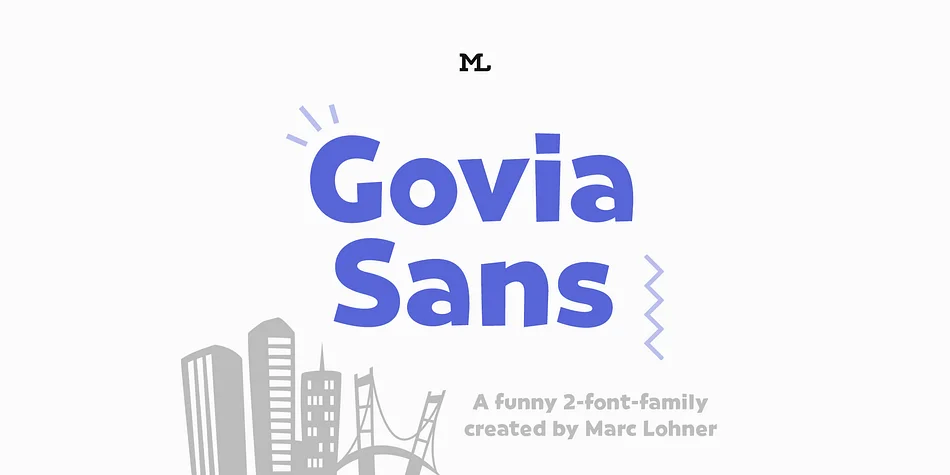
1 / 6About Govia Sans Font
Imagine laying out a children's board game where every label, title, and instruction needs to pop visually but stay readable at the same time. Marc Lohner's Govia Sans delivers on both counts, combining geometric shapes with a comic character that actually holds up at any size. The typeface thrives on product cartons, app navigation systems, greeting card suites, and indie video game interfaces, wherever you need personality without sacrificing legibility.
What makes Govia Sans work across such diverse applications is its careful balance. The letterforms remain crisp and clear even at smaller sizes, a feat many decorative typefaces can't achieve. You can choose between Medium and Bold weights depending on how much visual presence you want in your layout. The family doesn't stop at basic letters: ligatures, arrow glyphs, and oldstyle figures open up more intricate typographic possibilities. Language support spans over 200 languages, so international projects are fully covered.
The Bold weight particularly rewards designers who scale it large for headlines or focal points. Here the geometric quality and personality shine through with full force, creating the kind of visual impact that makes people look twice. Get Govia Sans on Creative Fabrica and discover a typeface with more practical utility than its lighthearted character might suggest.
Style & Use Cases
- Overall Style
- Bold, Distinctive
- Use Case
- Headlines, Posters
- Ideal For
- logos, packaging, and standout titles
- Pairs With
- a neutral sans-serif
How to Install Govia Sans Font
Step-by-step instructions for every platform
- 1Download the Govia Sans font file (.ttf or .otf).
- 2Locate the downloaded file in your Downloads folder.
- 3Right-click the font file.
- 4Select "Install" to install for the current user, or "Install for all users" to make it available system-wide.
- 5Govia Sans is now available in Word, Photoshop, Illustrator, and all other apps.
More by Marc Lohner
View all →
Browse fonts by theme
Curated collections →Saw a font in a picture? Identify any font from an image with our free Font Finder.
More Decorative Fonts
Browse all →







What pairs well with Govia Sans Font?
Govia Sans Font is a decorative font that shines as a display or heading face. Pair it with a clean sans-serif or serif font for body text — the contrast creates a clear hierarchy while the two styles stay balanced and easy to read.




Govia Sans Font
by Marc Lohner
Reviewed by the FontBoxDL team · Updated July 2026