 Firefox
 1 / 5
1 / 5About GOVERNMENT OFFICE JNL Font
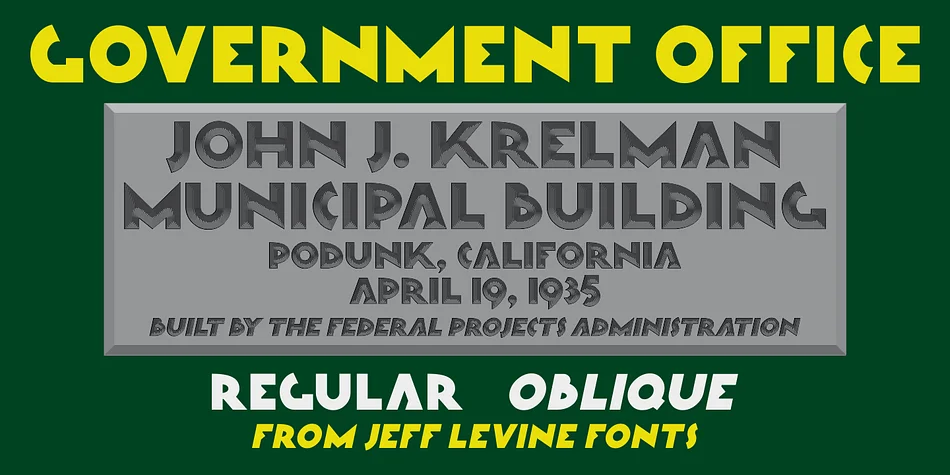
When you're laying out vintage-style certificates, retro diner menus, or any design calling for that distinctive 1930s-inspired government office aesthetic, Government Office JNL from Jeff Levine Fonts is exactly what you need. The font draws inspiration from an actual 1939 dedication plaque at Porterville City Hall in California, originally commissioned by the Federal Emergency Administration Public Works Department and rendered in striking Art Deco lettering. That historical reference gives it real weight, literally and figuratively.
Beyond period pieces, this decorative sans serif absolutely shines across art deco wedding invitations, speakeasy event branding, official-looking award certificates, and vintage business stationery. It balances authentic 1930s geometry with enough legibility that your message never gets buried in nostalgia. There's something about the slightly geometric letterforms that just feels right for anything invoking governmental elegance or New Deal-era design. The personality comes through without becoming ornamental or distracting.
The typeface is available in both regular and oblique styles, giving you flexibility to layer weight or create visual rhythm in longer layouts. At display sizes, the letters maintain their crisp edges and clean proportions, keeping that polished, official feeling intact. Grab it from Creative Fabrica and start channeling that golden-age design appeal into your projects.
Style & Use Cases
- Overall Style
- Bold, Distinctive
- Use Case
- Headlines, Posters
- Ideal For
- logos, packaging, and standout titles
- Pairs With
- a neutral sans-serif
How to Install GOVERNMENT OFFICE JNL Font
Step-by-step instructions for every platform
- 1Download the GOVERNMENT OFFICE JNL font file (.ttf or .otf).
- 2Locate the downloaded file in your Downloads folder.
- 3Right-click the font file.
- 4Select "Install" to install for the current user, or "Install for all users" to make it available system-wide.
- 5GOVERNMENT OFFICE JNL is now available in Word, Photoshop, Illustrator, and all other apps.
More by Jeff Levine Fonts
View all →



Browse fonts by theme
Curated collections →Saw a font in a picture? Identify any font from an image with our free Font Finder.
More Decorative Fonts
Browse all →







What pairs well with GOVERNMENT OFFICE JNL Font?
GOVERNMENT OFFICE JNL Font is a decorative font that shines as a display or heading face. Pair it with a clean sans-serif or serif font for body text — the contrast creates a clear hierarchy while the two styles stay balanced and easy to read.




GOVERNMENT OFFICE JNL Font
Reviewed by the FontBoxDL team · Updated June 2026