 Firefox
 1 / 8
1 / 8About Ghost Dog Cute Font
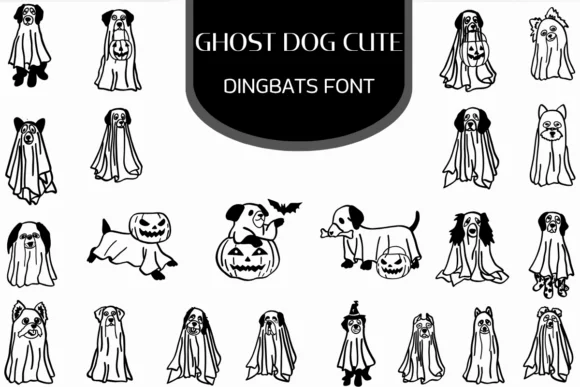
Imagine designing a set of Halloween party invitations and wondering how to make them feel playful rather than genuinely frightening for younger guests. Ghost Dog Cute, created by Heartcraft Atelier, is a dingbats font that solves this problem elegantly. Instead of the typical skull-and-crossbones visual language, you get cute ghost dogs, friendly specters, and whimsical puppy-themed characters that read as charming rather than scary.
This font works particularly well for Halloween party invitations aimed at kids, trick-or-treat bag labels that land cheerful instead of creepy, seasonal greeting cards with genuine personality, and printable activity pages designed for coloring. The full range of character designs means you can build layers of visual interest without hunting for additional illustrations or clip art. When you're working in Affinity Designer, Procreate, or Affinity Photo, these dingbats integrate smoothly, and you can layer them to create custom graphics in minutes.
The characters sit cleanly at any size, scaling from small decorative accents to large focal points without losing crispness. They pair well with most serif and sans-serif typefaces, so you're not restricted to a narrow design direction. Grab Ghost Dog Cute on Creative Fabrica and inject some mischievous charm into your next seasonal project.
Style & Use Cases
- Overall Style
- Iconographic, Fonts
- Use Case
- Icons, Accents
- Ideal For
- ornaments, bullets, and decorative flourishes
- Pairs With
- any text font
How to Install Ghost Dog Cute Font
Step-by-step instructions for every platform
- 1Download the Ghost Dog Cute font file (.ttf or .otf).
- 2Locate the downloaded file in your Downloads folder.
- 3Right-click the font file.
- 4Select "Install" to install for the current user, or "Install for all users" to make it available system-wide.
- 5Ghost Dog Cute is now available in Word, Photoshop, Illustrator, and all other apps.
More by Heartcraft Atelier
View all →



Browse fonts by theme
Curated collections →Saw a font in a picture? Identify any font from an image with our free Font Finder.
More Dingbats Fonts
Browse all →







What pairs well with Ghost Dog Cute Font?
Ghost Dog Cute Font is a versatile dingbats font that works for both headings and body text. Pair it with a contrasting sans-serif or serif font to add visual interest and a clear distinction between titles and body copy.




Ghost Dog Cute Font
Reviewed by the FontBoxDL team · Updated June 2026