 Firefox

 1 / 5
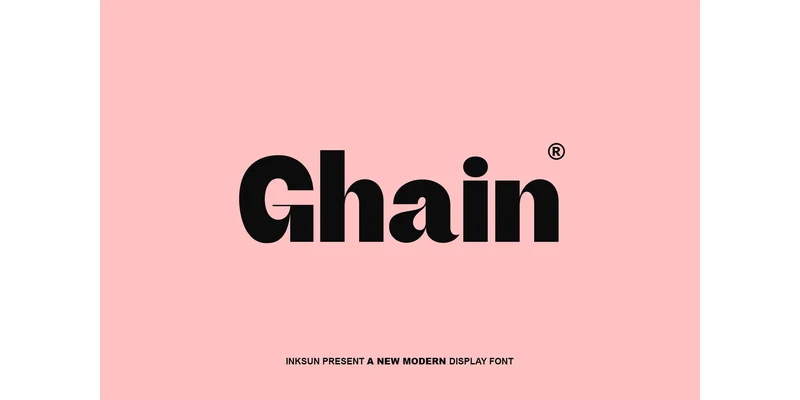
About Ghain Font
A designer working on a high-end tech startup's identity system reaches for Ghain Font by INKSUN™, a geometric sans-serif built for projects that require serious visual weight. The typeface uses high-contrast shapes combined with distinctive ink-trap detailing to command attention on any surface, making it a reliable choice for brand guidelines that demand both presence and refined execution.
The geometric construction proves particularly effective for tech company logos and corporate website headers, where clarity and boldness need to coexist without compromise. Its solid forms perform equally well in editorial spreads for contemporary magazines, where typography must hold its own against competing visual elements on the page. Product packaging for tech accessories and luxury goods labeling also benefit from its structured weight, which stays legible even when scaled to large formats. For event posters or conceptual branding campaigns targeting creative industries, the font's modern geometry provides visual distinction without unnecessary decoration.
Built with clean lines and a comprehensive character set, Ghain comes in multiple weights and includes the distinctive ink-trap style details that bring visual sophistication. The thick strokes and consistent geometric proportions mean it functions confidently whether deployed at headline scale or reduced to logo mark sizes. You can find it on Creative Fabrica, ready for your next commercial project.
Style & Use Cases
- Overall Style
- Clean, Modern, #aesthetic
- Use Case
- Body Text, UI
- Ideal For
- branding, interfaces, and modern layouts
- Pairs With
- a contrasting serif for headings
How to Install Ghain Font Font
Step-by-step instructions for every platform
- 1Download the Ghain Font font file (.ttf or .otf).
- 2Locate the downloaded file in your Downloads folder.
- 3Right-click the font file.
- 4Select "Install" to install for the current user, or "Install for all users" to make it available system-wide.
- 5Ghain Font is now available in Word, Photoshop, Illustrator, and all other apps.
Browse fonts by theme
Curated collections →Saw a font in a picture? Identify any font from an image with our free Font Finder.
More Sans Serif Fonts
Browse all →
What pairs well with Ghain Font?
Ghain Font is a versatile sans-serif font that works for both headings and body text. Pair it with a contrasting serif or slab serif font to add visual interest and a clear distinction between titles and body copy.
Ghain Font
by INKSUN™
Reviewed by the FontBoxDL team · Updated November 2026
One-time purchase