 Firefox
 1 / 8
1 / 8Loading font…
About Geometric Border Font
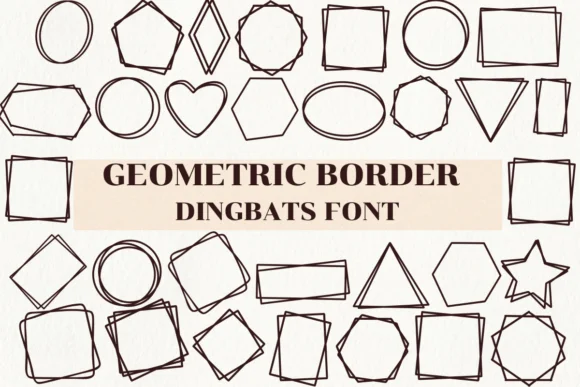
Geometric Border by Nongyao is an art deco dingbat constructed from paired geometric shapes, designed to compose ornate frames and decorative borders through clean lines and symmetrical arrangements. The font stacks circles, squares, and triangles in repeating patterns, with each character combining two shapes so you can layer multiple glyphs together to build continuous decorative edges and full border systems. The resulting graphic vocabulary balances typographic precision with a distinctly retro warmth while staying visually restrained.
This works beautifully for wedding invitation suites, boutique product packaging and custom labels, scrapbooking layouts, and vintage-inspired poster or signage work. The outline style stays crisp at any size, whether you're designing for digital screens or sending artwork to professional print production. Available in both OTF and TTF formats, it integrates easily with Procreate, Affinity Designer, Affinity Photo, and other standard design applications. You can layer it to create full border frames for social media graphics, use it as a framing accent on packaging tags, or build it into more complex compositional work.
The geometric shapes feel purposeful, never fussy. If you're looking for a dingbat that brings quiet structural sophistication to your work, grab Geometric Border on Creative Fabrica.
Style & Use Cases
- Overall Style
- Iconographic, Fonts
- Use Case
- Icons, Accents
- Ideal For
- ornaments, bullets, and decorative flourishes
- Pairs With
- any text font
How to Install Geometric Border Font
Step-by-step instructions for every platform
- 1Download the Geometric Border font file (.ttf or .otf).
- 2Locate the downloaded file in your Downloads folder.
- 3Right-click the font file.
- 4Select "Install" to install for the current user, or "Install for all users" to make it available system-wide.
- 5Geometric Border is now available in Word, Photoshop, Illustrator, and all other apps.




Browse fonts by theme
Curated collections →Saw a font in a picture? Identify any font from an image with our free Font Finder.
More Dingbats Fonts
Browse all →







What pairs well with Geometric Border Font?
Geometric Border Font is a versatile dingbats font that works for both headings and body text. Pair it with a contrasting sans-serif or serif font to add visual interest and a clear distinction between titles and body copy.




Geometric Border Font
by Nongyao
Reviewed by the FontBoxDL team · Updated October 2026