
 1 / 9
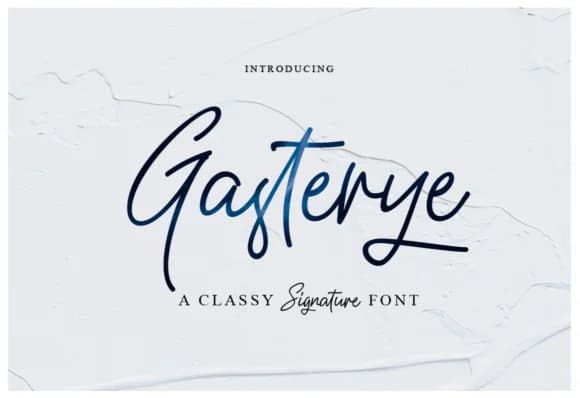
1 / 9About Gasterye Font
Gasterye by Ijem RockArt is a hand-lettered script that balances casual confidence with refined elegance. The font carries a distinctive personality that works equally well in laid-back and sophisticated contexts. Its organic letterforms flow naturally across the page, creating an authentic handwritten aesthetic without requiring laborious manual lettering. The design maintains excellent readability even while delivering genuine visual warmth and character.
This typeface suits wedding invitation suites, where couples want personal charm without losing formality. It's equally at home creating custom product packaging for boutique brands, designing personalized thank you cards that feel genuinely handwritten, or developing eye-catching social media graphics that stand out. Small business owners appreciate how Gasterye adds credibility through its polished yet approachable appearance, whether for hand-lettered logo treatments, personalized branding materials, or decorative signage. The included marker font variant opens additional creative directions, letting you pair styles for layered compositions or visual emphasis.
Multiple weights give you control across different applications, from delicate accents to bold statements. Whether displayed large on posters or sized appropriately for packaging labels, Gasterye's intuitive construction ensures consistent quality. The letterforms work beautifully for anyone seeking that handmade touch for modern designs. Find Gasterye on Creative Fabrica and add this versatile script to your typography toolkit.
Style & Use Cases
- Overall Style
- Elegant, Flowing, Gasterye Script
- Use Case
- Invitations, Branding
- Ideal For
- wedding stationery, greeting cards, and signatures
- Pairs With
- a simple uppercase sans
How to Install Gasterye Font Font
Step-by-step instructions for every platform
- 1Download the Gasterye Font font file (.ttf or .otf).
- 2Locate the downloaded file in your Downloads folder.
- 3Right-click the font file.
- 4Select "Install" to install for the current user, or "Install for all users" to make it available system-wide.
- 5Gasterye Font is now available in Word, Photoshop, Illustrator, and all other apps.
More by Ijem RockArt
View all →
More Script Handwritten Fonts
Browse all →







What pairs well with Gasterye Font?
Gasterye Font is a script font that shines as a display or heading face. Pair it with a clean sans-serif or serif font for body text — the contrast creates a clear hierarchy while the two styles stay balanced and easy to read.



Gasterye Font
by Ijem RockArt
Reviewed by the FontBoxDL team · Updated May 2026