 Firefox
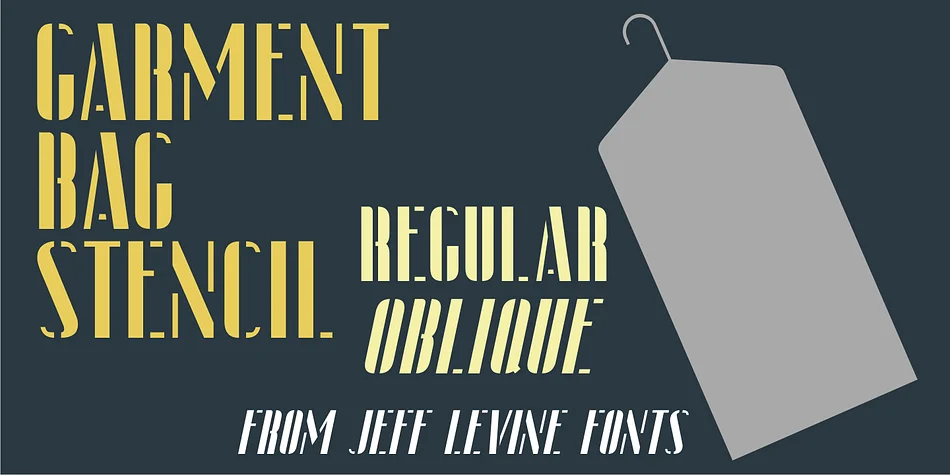
About GARMENT BAG STENCIL JNL Font
Picture a vintage luggage label from the Art Deco era, complete with hand-cut stencil letterforms that defined the visual language of an entire age. Garment Bag Stencil JNL, designed by Jeff Levine Fonts, draws inspiration from an original French metal stencil marked "Bagages" (luggage). The font captures that condensed, geometric aesthetic faithfully in digital form, holding a careful balance between open letterforms and solid strokes for maximum character and legibility at any size.
This font thrives on vintage luggage tags, retro travel posters, speakeasy-themed branding, and hand-painted boutique storefront signage. Its Art Deco heritage makes it the natural choice for any project that craves nostalgic glamour combined with geometric precision. Both regular and oblique versions come included, each offering distinct advantages for your creative work. Choose the oblique for dynamic layouts where subtle movement adds visual energy, or stick with the regular for crisp clarity on straightforward applications. Both weights maintain excellent presence when scaled large, working equally well spray-painted on a mural or rendered fine for delicate label details.
Find Garment Bag Stencil JNL on Creative Fabrica to bring authentic Art Deco stencil character to your designs.
Style & Use Cases
- Overall Style
- Bold, Distinctive
- Use Case
- Headlines, Posters
- Ideal For
- logos, packaging, and standout titles
- Pairs With
- a neutral sans-serif
How to Install GARMENT BAG STENCIL JNL Font
Step-by-step instructions for every platform
- 1Download the GARMENT BAG STENCIL JNL font file (.ttf or .otf).
- 2Locate the downloaded file in your Downloads folder.
- 3Right-click the font file.
- 4Select "Install" to install for the current user, or "Install for all users" to make it available system-wide.
- 5GARMENT BAG STENCIL JNL is now available in Word, Photoshop, Illustrator, and all other apps.
More by Jeff Levine Fonts
View all →



Browse fonts by theme
Curated collections →Saw a font in a picture? Identify any font from an image with our free Font Finder.
More Decorative Fonts
Browse all →







What pairs well with GARMENT BAG STENCIL JNL Font?
GARMENT BAG STENCIL JNL Font is a decorative font that shines as a display or heading face. Pair it with a clean sans-serif or serif font for body text — the contrast creates a clear hierarchy while the two styles stay balanced and easy to read.




GARMENT BAG STENCIL JNL Font
Reviewed by the FontBoxDL team · Updated June 2026