
 1 / 8
1 / 8About Furniture Font
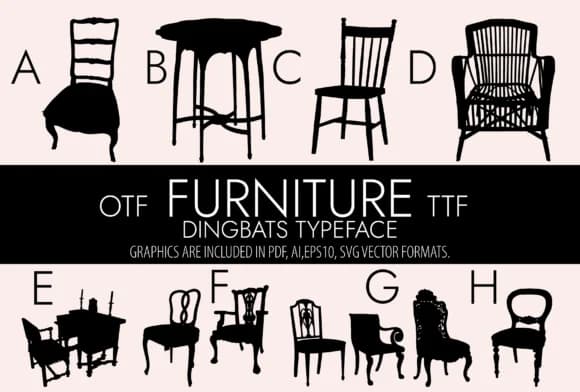
Furniture by Minimalistartstudio is a dingbats font built around clean silhouettes of household objects, from chairs and desks to mirrors and storage pieces. Rather than hunting through separate graphic files or struggling with vector paths, you get a complete set of furniture icons embedded right in a typeface. Each character maps to a different piece, so you can work with it as a practical toolkit instead of relying on decorative add-ons that feel disconnected from your typography.
Use it for interior design mood boards, where furniture symbols help your clients visualize room layouts before committing to purchases. Real estate agents can work these icons into property listings to communicate spatial concepts at a glance. Home goods packaging and stationery designs benefit from these symbols as subtle visual anchors that reinforce your brand identity. Social media graphics for furniture stores or interior design services come together faster when you have consistent, ready-made glyphs right at hand. The font includes a wide range of pieces that scale smoothly with your text, keeping sizing flexible and proportions correct across different layout contexts.
Download Furniture from Creative Fabrica and put these symbols to work in your next project.
Style & Use Cases
- Overall Style
- Iconographic, Furniture
- Use Case
- Icons, Accents
- Ideal For
- ornaments, bullets, and decorative flourishes
- Pairs With
- any text font
How to Install Furniture Font
Step-by-step instructions for every platform
- 1Download the Furniture font file (.ttf or .otf).
- 2Locate the downloaded file in your Downloads folder.
- 3Right-click the font file.
- 4Select "Install" to install for the current user, or "Install for all users" to make it available system-wide.
- 5Furniture is now available in Word, Photoshop, Illustrator, and all other apps.
More by Minimalistartstudio
View all →



Browse fonts by theme
Curated collections →Saw a font in a picture? Identify any font from an image with our free Font Finder.
More Dingbats Fonts
Browse all →







What pairs well with Furniture Font?
Furniture Font is a versatile dingbats font that works for both headings and body text. Pair it with a contrasting sans-serif or serif font to add visual interest and a clear distinction between titles and body copy.



Furniture Font
Reviewed by the FontBoxDL team · Updated July 2026