 Firefox
 1 / 5
1 / 5About Fruit Shipper JNL Font
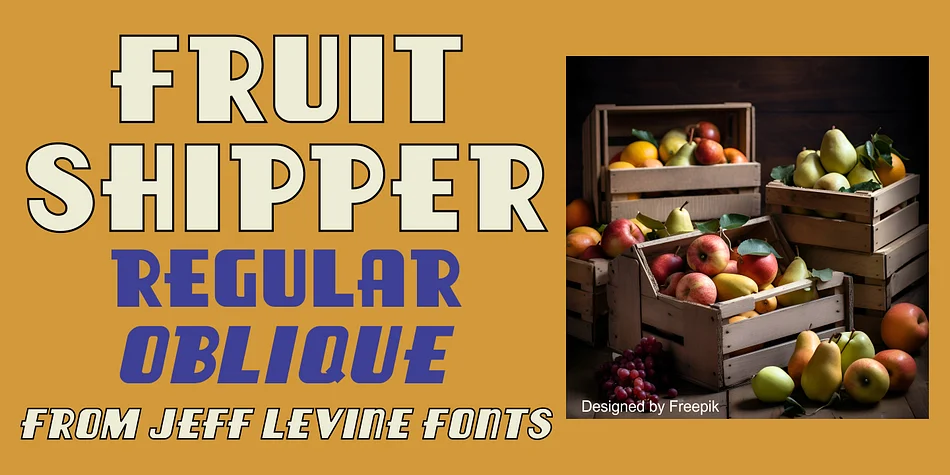
Fruit Shipper JNL by Jeff Levine Fonts is a chunky Art Deco typeface sourced from hand-lettered graphics on authentic 1930s Spanish fruit crate labels. The typeface captures that era's boldness and geometric warmth, pulling its character from packaging designed for the A. Valldecabres company. What you get is a font that feels genuinely vintage without relying on tired retro clichés.
This weight works best for headlines and short bursts of text where you need real visual stopping power. The letters sit solid and confident, with the kind of presence you need when space is limited and impact matters. It comes in both regular and oblique versions, giving you flexibility for dynamic layouts and tilted emphasis. You'll find it especially useful for wine label designs, retro candy packaging, vintage deli menus, and hand-lettered product label work where authentic letterforms carry the design weight.
Since this is a statement typeface, a little goes a long way. Pair it with breathing room and let the geometry of the letters do the talking. The directness of the weight pairs well with minimal supporting text or complementary typefaces. Grab Fruit Shipper JNL from Creative Fabrica and add it to your type collection.
Style & Use Cases
- Overall Style
- Bold, Distinctive
- Use Case
- Headlines, Posters
- Ideal For
- logos, packaging, and standout titles
- Pairs With
- a neutral sans-serif
How to Install Fruit Shipper JNL Font
Step-by-step instructions for every platform
- 1Download the Fruit Shipper JNL font file (.ttf or .otf).
- 2Locate the downloaded file in your Downloads folder.
- 3Right-click the font file.
- 4Select "Install" to install for the current user, or "Install for all users" to make it available system-wide.
- 5Fruit Shipper JNL is now available in Word, Photoshop, Illustrator, and all other apps.
More by Jeff Levine Fonts
View all →



Browse fonts by theme
Curated collections →Saw a font in a picture? Identify any font from an image with our free Font Finder.
More Decorative Fonts
Browse all →







What pairs well with Fruit Shipper JNL Font?
Fruit Shipper JNL Font is a decorative font that shines as a display or heading face. Pair it with a clean sans-serif or serif font for body text — the contrast creates a clear hierarchy while the two styles stay balanced and easy to read.




Fruit Shipper JNL Font
Reviewed by the FontBoxDL team · Updated June 2026