
 1 / 8
1 / 8About Frames Creator 2.0 Font
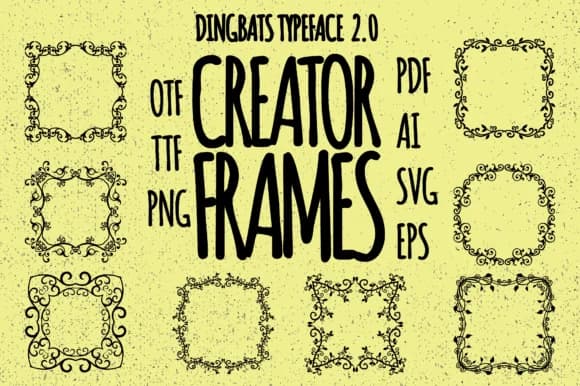
Frames Creator 2.0 delivers intricate ornamental borders that merge baroque, oriental, and gothic influences into one comprehensive decorative toolkit. Designed by Minimalistartstudio, this dingbats font provides an extensive collection of classical frames, flourishes, and decorative elements that deliver both detailed craftsmanship and careful consideration to every curve.
The typeface excels when formal ornamentation sets the design direction. Wedding invitation suites gain sophisticated frame options that convey elegance and tradition, while vintage product labels for independent etsy shops find ready-made borders that communicate craft and quality. Scrapbooking layouts benefit from authentic decorative elements that connect pages visually and create visual cohesion, and greeting card designs can frame their content with classical flourishes without building elements from scratch. The geometric and floral frame variations provide options to match different design approaches, from symmetrical to organic compositions.
Frames Creator 2.0 works best for designers and small business owners building traditional, upscale projects that need dimensional framing and ornamental detail. Boutique brand packaging, certificates, formal documents, and custom monogram designs all gain dimension and sophistication through its varied frame styles. You'll find Frames Creator 2.0 on Creative Fabrica, where you can access it whenever you need refined decorative borders and framing solutions.
Style & Use Cases
- Overall Style
- Iconographic, Frames
- Use Case
- Icons, Accents
- Ideal For
- ornaments, bullets, and decorative flourishes
- Pairs With
- any text font
How to Install Frames Creator 2.0 Font
Step-by-step instructions for every platform
- 1Download the Frames Creator 2.0 font file (.ttf or .otf).
- 2Locate the downloaded file in your Downloads folder.
- 3Right-click the font file.
- 4Select "Install" to install for the current user, or "Install for all users" to make it available system-wide.
- 5Frames Creator 2.0 is now available in Word, Photoshop, Illustrator, and all other apps.
More by Minimalistartstudio
View all →



Browse fonts by theme
Curated collections →Saw a font in a picture? Identify any font from an image with our free Font Finder.
More Dingbats Fonts
Browse all →







What pairs well with Frames Creator 2.0 Font?
Frames Creator 2.0 Font is a versatile dingbats font that works for both headings and body text. Pair it with a contrasting sans-serif or serif font to add visual interest and a clear distinction between titles and body copy.



Frames Creator 2.0 Font
Reviewed by the FontBoxDL team · Updated July 2026