 Firefox
 1 / 3
1 / 3Loading font…
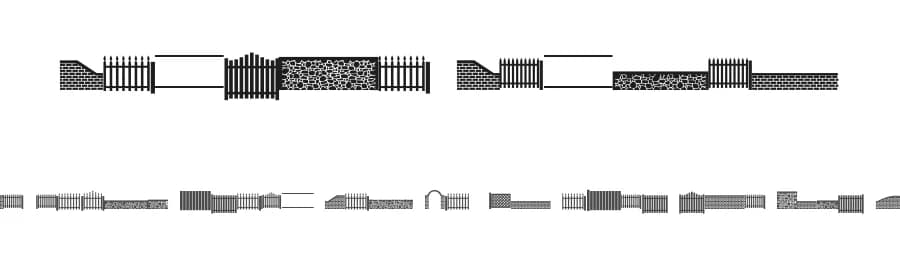
About FontCo Fences Font
FontCo Fences is a dingbat font created by John Bruce, offering 101 distinct shapes and decorative symbols for designers who need ornamental elements beyond standard typography. With support for 104+ Latin-based languages, this font integrates into projects with a global audience in mind. The regular weight provides consistent visual weight across all characters, making it reliable for both digital and print applications without requiring weight-specific adjustments.
Scrapbooking enthusiasts will find this symbol set invaluable for embellishing page layouts and adding visual interest to photo arrangements without heavy-handed decoration. Greeting card designers can layer these shapes to construct custom borders and frames, creating hand-crafted effects that feel personal rather than corporate. Planner creators use dingbat sets like this one to build custom bullet-point systems and section dividers that unify an entire journal's aesthetic. Children's book illustrators also benefit from these symbols, using them to add playful ornamental touches throughout spreads without switching fonts mid-document.
Because FontCo Fences offers a focused, thematic symbol set, it works best when you want intentional decoration tied to a specific visual concept. The 101-character collection is substantial enough for layering and combination but intimate enough to maintain cohesion. Licensed for personal use only, with commercial licensing available directly from the designer, this font is ideal for personal projects and side work. Choose it when consistency and intentionality matter more than sheer glyph abundance.
Style & Use Cases
- Overall Style
- Iconographic, Dingbats
- Use Case
- Icons, Accents
- Ideal For
- ornaments, bullets, and decorative flourishes
- Pairs With
- any text font
FontCo Fences Specifications
| Font Family | FontCo Fences |
| Style | Regular |
| Full Name | FontCo Fences |
| Version | Macromedia Fontographer 4.1 8/5/99 |
| Weight | 400 (Regular) |
| Glyph Count | 101 glyphs |
| PostScript Name | FontCoFences |
| Format | TTF (TrueType) |
| File Size | 69.5 KB |
Languages Supported
FontCo Fences supports 104 languages.
How to Install FontCo Fences Font
Step-by-step instructions for every platform
- 1Download the FontCo Fences font file (.ttf or .otf).
- 2Locate the downloaded file in your Downloads folder.
- 3Right-click the font file.
- 4Select "Install" to install for the current user, or "Install for all users" to make it available system-wide.
- 5FontCo Fences is now available in Word, Photoshop, Illustrator, and all other apps.
More by John Bruce
View all →

Browse fonts by theme
Curated collections →Saw a font in a picture? Identify any font from an image with our free Font Finder.
More Dingbats Fonts
Browse all →







What pairs well with FontCo Fences Font?
FontCo Fences Font is a versatile dingbats font that works for both headings and body text. Pair it with a contrasting sans-serif or serif font to add visual interest and a clear distinction between titles and body copy.



Premium Dingbats Fonts
★ PremiumWant something with more weights, glyphs, and commercial polish? These premium dingbats fonts are worth a look.


FontCo Fences Font
by John Bruce
Reviewed by the FontBoxDL team · Updated October 2026
License: Free for personal use