 Firefox
 1 / 4
1 / 4About Foliage Font
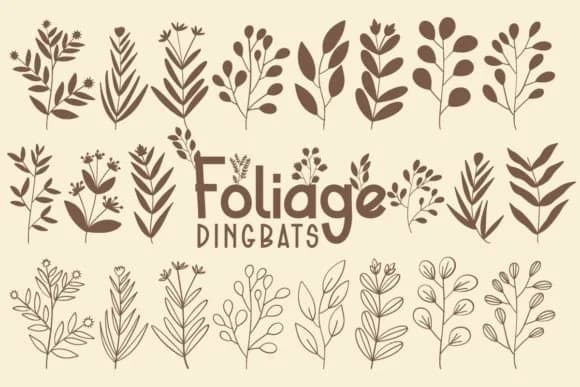
Foliage, designed by Font-Tastic, is a dingbat collection rooted in botanical forms. The glyphs capture leaf shapes, organic stems, and decorative flourishes with a balance between naturalistic detail and contemporary restraint. Each character works both as a standalone decorative mark and as part of layered compositions, giving you flexibility in how you structure the page.
Deploy these elements as ornamental dividers in wedding invitation suites, where they'll thread between text sections without competing for attention. Use them across product packaging for artisanal skincare, coffee blends, or handmade goods, adding visual warmth to labels that feel handcrafted. In greeting card designs, scatter them to anchor layouts or create framing effects around your type. Boutique logo marks and stationery suites become richer when you weave in these glyphs as background textures or structural accents. The variety within the set means you won't exhaust the visual vocabulary halfway through a project. These work particularly well in editorial spreads where you need organic breaks between sections.
This font pairs best with brands and designers building nature-forward identities. It brings botanical language to wedding invitations, product packaging, and editorial layouts without forcing a rustic cliché. Find it on Creative Fabrica and layer it into your next project.
Style & Use Cases
- Overall Style
- Iconographic
- Use Case
- Icons, Accents
- Ideal For
- ornaments, bullets, and decorative flourishes
- Pairs With
- any text font
How to Install Foliage Font
Step-by-step instructions for every platform
- 1Download the Foliage font file (.ttf or .otf).
- 2Locate the downloaded file in your Downloads folder.
- 3Right-click the font file.
- 4Select "Install" to install for the current user, or "Install for all users" to make it available system-wide.
- 5Foliage is now available in Word, Photoshop, Illustrator, and all other apps.
More by Font-Tastic
View all →
Browse fonts by theme
Curated collections →Saw a font in a picture? Identify any font from an image with our free Font Finder.
More Dingbats Fonts
Browse all →







What pairs well with Foliage Font?
Foliage Font is a versatile dingbats font that works for both headings and body text. Pair it with a contrasting sans-serif or serif font to add visual interest and a clear distinction between titles and body copy.



Foliage Font
by Font-Tastic
Reviewed by the FontBoxDL team · Updated July 2026