 Firefox
 1 / 4
1 / 4About Line Arrows Font
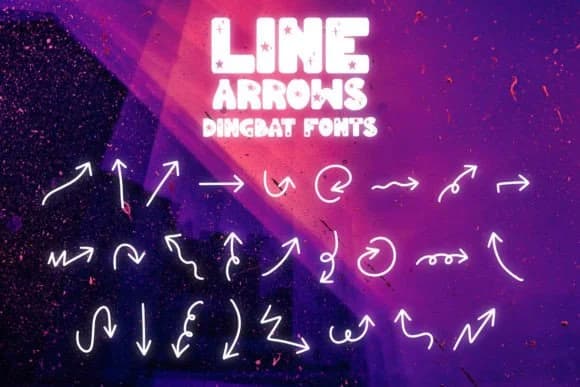
Hand-drawn arrows that feel genuinely alive when placed on a page. Line Arrows, designed by Font-Tastic, delivers the kind of directional marks that work when you want personality without veering into chaos. The pen-and-ink style gives these pointers an approachable, sketched quality that reads warmer than any mechanical symbol could. Each mark has visible linework, keeping the forms light and airy.
Reach for this when you're building infographics that need a conversational tone rather than a stiff corporate feel. Flowcharts become more human when these arrows guide the viewer through steps. Event program covers gain character from the handmade vibe. Social media story graphics come alive when you use these instead of standard directional indicators. Handmade label designs, whether for small-batch goods, Etsy product packaging, or DIY craft projects, gain genuine presence when you swap a mechanical arrow for one with real linework. The light weight keeps layouts breathing instead of feeling cramped.
Pair Line Arrows with a clean geometric sans-serif for your body text and navigation labels, and you've built a cohesive system that feels intentional rather than random. It's available on Creative Fabrica when you're ready to add it to your collection.
Style & Use Cases
- Overall Style
- Iconographic, Arrows
- Use Case
- Icons, Accents
- Ideal For
- ornaments, bullets, and decorative flourishes
- Pairs With
- any text font
How to Install Line Arrows Font
Step-by-step instructions for every platform
- 1Download the Line Arrows font file (.ttf or .otf).
- 2Locate the downloaded file in your Downloads folder.
- 3Right-click the font file.
- 4Select "Install" to install for the current user, or "Install for all users" to make it available system-wide.
- 5Line Arrows is now available in Word, Photoshop, Illustrator, and all other apps.
More by Font-Tastic
View all →


Browse fonts by theme
Curated collections →Saw a font in a picture? Identify any font from an image with our free Font Finder.
More Dingbats Fonts
Browse all →







What pairs well with Line Arrows Font?
Line Arrows Font is a versatile dingbats font that works for both headings and body text. Pair it with a contrasting sans-serif or serif font to add visual interest and a clear distinction between titles and body copy.



Line Arrows Font
by Font-Tastic
Reviewed by the FontBoxDL team · Updated July 2026