 Firefox
 1 / 8
1 / 8Loading font…
About Flying Eagle Font
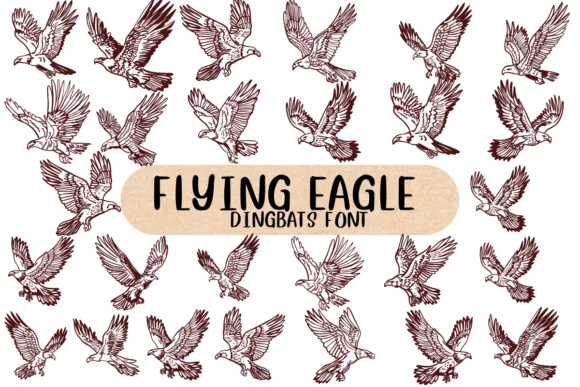
This dingbat set captures the exhilaration of birds in motion. Flying Eagle, designed by Nongyao, is a carefully curated collection of soaring and perched birds rendered in clean, vector-style silhouettes that scale without losing detail. The set includes multiple eagle poses and related avian forms, giving you plenty of compositional options for layering, stacking, and arranging within your layouts. The varied bird positions mean you can create natural-looking flocks or use individual birds as accent marks.
The real value here is the flexibility for illustrative work across different mediums. You'll find this set works beautifully for nature-themed greeting card designs, children's book illustrations, wildlife journal covers, and stacked decorative elements in animal-focused apparel graphics. Since these are vector outlines rather than solid fills, you can easily recolor them to match any project palette or layer them for visual depth. The silhouette approach means they read clearly at any size, from large hero elements down to small accent details, so there's no compromise on legibility when you scale them up or down.
Pair these birds with a clean headline font, preferably a sans-serif that lets the dingbats take center stage. Grab Flying Eagle on Creative Fabrica and start composing your next bird-filled design.
Style & Use Cases
- Overall Style
- Iconographic, Fonts
- Use Case
- Icons, Accents
- Ideal For
- ornaments, bullets, and decorative flourishes
- Pairs With
- any text font
How to Install Flying Eagle Font
Step-by-step instructions for every platform
- 1Download the Flying Eagle font file (.ttf or .otf).
- 2Locate the downloaded file in your Downloads folder.
- 3Right-click the font file.
- 4Select "Install" to install for the current user, or "Install for all users" to make it available system-wide.
- 5Flying Eagle is now available in Word, Photoshop, Illustrator, and all other apps.




Browse fonts by theme
Curated collections →Saw a font in a picture? Identify any font from an image with our free Font Finder.
More Dingbats Fonts
Browse all →







What pairs well with Flying Eagle Font?
Flying Eagle Font is a versatile dingbats font that works for both headings and body text. Pair it with a contrasting sans-serif or serif font to add visual interest and a clear distinction between titles and body copy.




Flying Eagle Font
by Nongyao
Reviewed by the FontBoxDL team · Updated October 2026