
 1 / 3
1 / 3About Flowerose Font
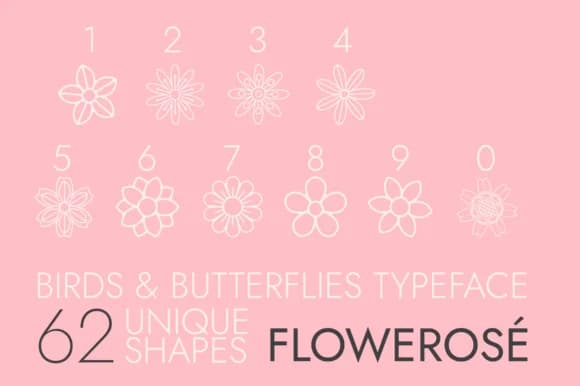
Flowerose is a dingbats collection of delicate florals and rose ornaments, each blooming with a hand-drawn quality that brings botanical softness to design work. Created by Minimalistartstudio, this ornamental font replaces traditional characters with botanically-inspired marks, offering designers an alternative to text-based decoration.
The real appeal lies in how versatile these florets prove across different mediums. Wedding invitation suites come alive with Flowerose flourishes layered over serif text, while boutique skincare brands use the flower motifs for minimalist packaging labels. Etsy sellers incorporate the botanical elements into product tags and shop graphics, and monogram designers combine rose marks with initials to craft personalized gift items. Scrapbookers find the flowers work as natural page borders and embellishments, while the set also functions as line art for coloring pages, children's book illustration, or hand-lettered stationery design.
For designers seeking that organic, cottage-core aesthetic in their visual systems, Flowerose delivers a library of ready-to-use botanical marks. The font particularly suits projects where femininity and nature-forward sensibility matter: branding for artisan makers, DIY craft event signage, or small-run publishing. Find Flowerose on Creative Fabrica and add this garden of ornamentation to your design toolkit.
Style & Use Cases
- Overall Style
- Iconographic, Beauty Fonts
- Use Case
- Icons, Accents
- Ideal For
- ornaments, bullets, and decorative flourishes
- Pairs With
- any text font
How to Install Flowerose Font
Step-by-step instructions for every platform
- 1Download the Flowerose font file (.ttf or .otf).
- 2Locate the downloaded file in your Downloads folder.
- 3Right-click the font file.
- 4Select "Install" to install for the current user, or "Install for all users" to make it available system-wide.
- 5Flowerose is now available in Word, Photoshop, Illustrator, and all other apps.
More by Minimalistartstudio
View all →



Browse fonts by theme
Curated collections →Saw a font in a picture? Identify any font from an image with our free Font Finder.
More Dingbats Fonts
Browse all →







What pairs well with Flowerose Font?
Flowerose Font is a versatile dingbats font that works for both headings and body text. Pair it with a contrasting sans-serif or serif font to add visual interest and a clear distinction between titles and body copy.



Flowerose Font
Reviewed by the FontBoxDL team · Updated July 2026