 Firefox
 1 / 8
1 / 8About Flower Frame Font
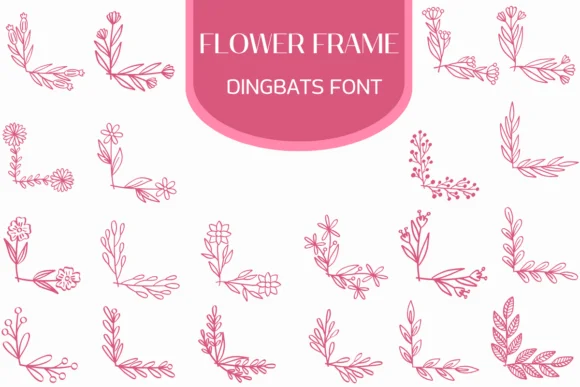
You're laying out a wedding invitation suite, and you need those decorative corners that feel handmade without actually being hand-drawn. That's where Flower Frame, a dingbats font by Heartcraft Atelier, comes in. Instead of copying and pasting the same border repeatedly, you get a collection of unique botanical corner frames that slot into your layout instantly. Each frame is its own glyph, giving you complete control over placement, layering, and arrangement.
This works across so many applications: bridal shower invitations where soft botanical details matter, scrapbook layouts that call for period-appropriate florals, custom greeting card designs with wrapped corners, and boutique product labels where you want handcrafted character without the actual hand-drawing. The corner frames read crisp and intentional across different sizes, which makes them work equally well on small cards or when you scale them up for signage. The botanical detail stays legible whether you're placing frames in all four corners or running them as a continuous border element.
Available in OTF and TTF formats, Flower Frame integrates with all the major design apps. Add it to your Creative Fabrica library and start building those nature-inspired pieces.
Style & Use Cases
- Overall Style
- Iconographic, Fonts
- Use Case
- Icons, Accents
- Ideal For
- ornaments, bullets, and decorative flourishes
- Pairs With
- any text font
How to Install Flower Frame Font
Step-by-step instructions for every platform
- 1Download the Flower Frame font file (.ttf or .otf).
- 2Locate the downloaded file in your Downloads folder.
- 3Right-click the font file.
- 4Select "Install" to install for the current user, or "Install for all users" to make it available system-wide.
- 5Flower Frame is now available in Word, Photoshop, Illustrator, and all other apps.
More by Heartcraft Atelier
View all →



Browse fonts by theme
Curated collections →Saw a font in a picture? Identify any font from an image with our free Font Finder.
More Dingbats Fonts
Browse all →







What pairs well with Flower Frame Font?
Flower Frame Font is a versatile dingbats font that works for both headings and body text. Pair it with a contrasting sans-serif or serif font to add visual interest and a clear distinction between titles and body copy.




Flower Frame Font
Reviewed by the FontBoxDL team · Updated June 2026