 Firefox
 1 / 6
1 / 6About Floria Font
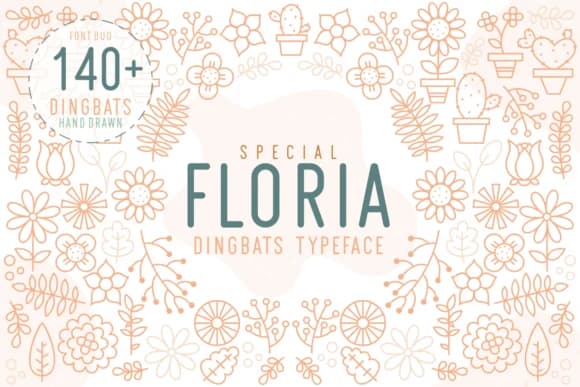
Floria by Kelik (7NTypes) is a sweet floral dingbats font that brings genuine hand-drawn charm to your decorative work. The collection shines when you need ornamental borders for wedding invitations, botanical frames for inspirational quotes in brand materials, or delicate accents on luxury beauty packaging and artisanal product labels. Designers working on DIY craft projects and handmade stationery find this font especially useful for adding organic flourishes without relying solely on photography or illustration.
What makes Floria stand out is the thoughtful range of flower motifs and decorative elements that read organic rather than clip-art generic. You can layer individual pieces to craft custom monogram designs or build logo embellishments and ornamental badges entirely within your layout software. This versatile approach works equally well whether you're designing something for screen mockups or preparing files for print production, from high-end packaging runs to small-batch Etsy label designs and handmade product tags.
Having Floria in your toolkit means faster workflows whenever a project calls for that handmade, personal aesthetic. The font pairs well with clean typography or other decorative families, giving you flexibility in how you deploy it across different project types. Get it on Creative Fabrica and add these florals to your working library.
Style & Use Cases
- Overall Style
- Iconographic, Flower
- Use Case
- Icons, Accents
- Ideal For
- ornaments, bullets, and decorative flourishes
- Pairs With
- any text font
How to Install Floria Font
Step-by-step instructions for every platform
- 1Download the Floria font file (.ttf or .otf).
- 2Locate the downloaded file in your Downloads folder.
- 3Right-click the font file.
- 4Select "Install" to install for the current user, or "Install for all users" to make it available system-wide.
- 5Floria is now available in Word, Photoshop, Illustrator, and all other apps.
More by Kelik - 7NTypes
View all →

Browse fonts by theme
Curated collections →Saw a font in a picture? Identify any font from an image with our free Font Finder.
More Dingbats Fonts
Browse all →







What pairs well with Floria Font?
Floria Font is a versatile dingbats font that works for both headings and body text. Pair it with a contrasting sans-serif or serif font to add visual interest and a clear distinction between titles and body copy.



Floria Font
Reviewed by the FontBoxDL team · Updated July 2026